Seleziona un'organizzazione
How to confirm what fonts are used in a PDF file exported from Tableau Server
Data pubblicazione: Mar 19, 2026
Operazione
Because the fonts on the Linux OS are usually not the same as the fonts on a Windows operating system, how can we determine what fonts are used in the PDF files which are exported from Tableau Server?
Fasi
Option 1
1. Open the PDF file with any text editor.
2. Search with the keyword "/fontname". You will see some search results like below. The string after "/QxxAAA+" should be the font in the PDF files. For this example, the font is "DejaVuSans-Bold".
/FontName /QxxxAAA+DejaVuSans-Bold
3. Continue to search with the keyword "/fontname" to confirm next font.Option 2
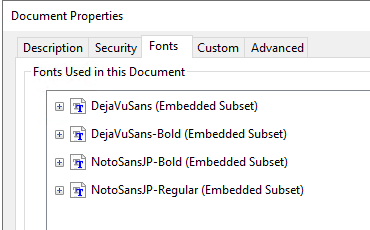
1. Open the PDF file with Adobe Acrobat Reader.2. Press "Ctrl-D" or select "Properties" from the File menu.
3. In the Document Properties window, click the "Fonts" tab to confirm the fonts embedded in the PDF.
Numero articolo Knowledge
001465218
Questo articolo ha risolto il problema?
Facci sapere, così possiamo migliorare!
