Sélectionner une organisation
How to avoid showing duplicate texts in text label data
Date de publication: Feb 25, 2026
Tâche
How not to repeat the specified string in the text for each data.
<Current Behavior>
<Desired Behavior>


Étapes
2. Create a new calculated field as following.
Name : Show Category Name
Calculation : IF FIRST()=0 THEN 'This data has'+' "'+ATTR([Category])+'"'
ELSEIF LAST()=0 THEN '"'+ATTR([Category])+'" .'
ELSE '"'+ATTR([Category])+'"'
END
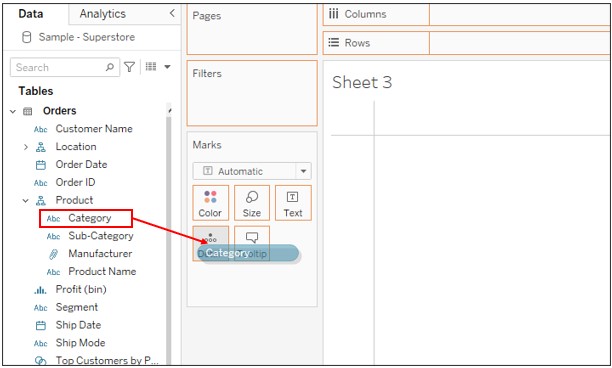
3. Drag [Category] to Detail on Marks.
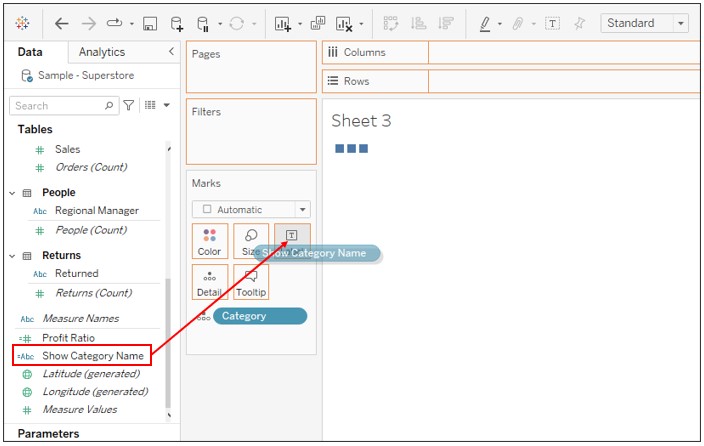
4. Drag [Show Category Name] to Text on Marks.
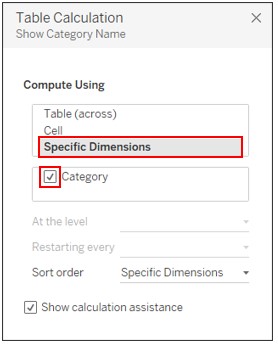
5. Right click on [Show Category Name] on Marks -> Edit Table Calculation -> Set as following.
Numéro d’article de la base de connaissances
001465266
Cet article a-t-il résolu votre problème ?
Dites-nous ce que nous pouvons améliorer !
