Velg en organisasjon
How to avoid showing duplicate texts in text label data
Publiseringsdato: Feb 25, 2026
Oppgave
How not to repeat the specified string in the text for each data.
<Current Behavior>
<Desired Behavior>


Trinn
2. Create a new calculated field as following.
Name : Show Category Name
Calculation : IF FIRST()=0 THEN 'This data has'+' "'+ATTR([Category])+'"'
ELSEIF LAST()=0 THEN '"'+ATTR([Category])+'" .'
ELSE '"'+ATTR([Category])+'"'
END
3. Drag [Category] to Detail on Marks.
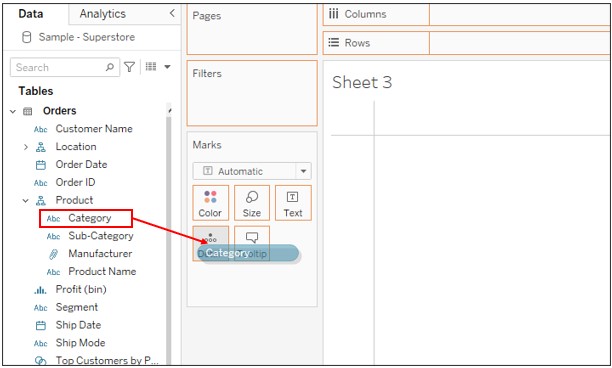
4. Drag [Show Category Name] to Text on Marks.
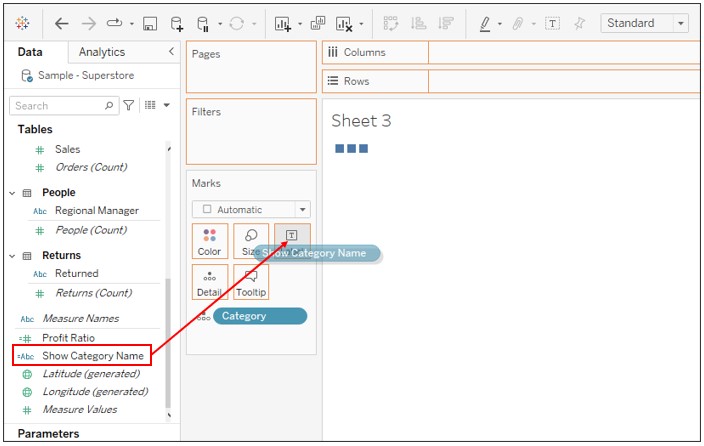
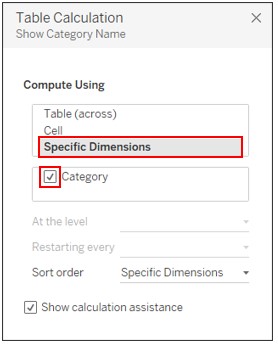
5. Right click on [Show Category Name] on Marks -> Edit Table Calculation -> Set as following.
Knowledge-artikkelnummer
001465266
Hjalp denne artikkelen med å løse problemet ditt?
La oss få vite det slik at vi kan forbedre!
