Velg en organisasjon
Copying a Published Data Source from One Project to Another
Publiseringsdato: Apr 22, 2026
Oppgave
Trinn
- Open Tableau Desktop and select Connect To Data > Tableau Server.
- Sign in to Tableau Server by using a publisher user account.
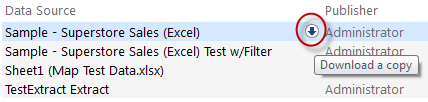
- Hover the pointer over the relevant published data connection, and then click Download a copy.
A local copy of the published data connection will be downloaded to the local computer as a file. - In Tableau Desktop, connect to the downloaded data source.
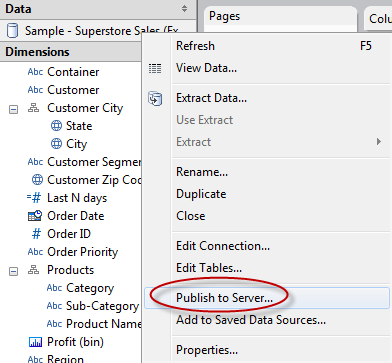
- Right-click the data source in the Data pane, and then select Publish to Server.
- Select a different project from the drop-down list, and then click Publish.
Flere ressurser
To voice your support for the inclusion of this feature request in a future product release, add your vote to the following Community Idea: A new way of managing Data Sources - ONE data source across multiple sites / projects.
Knowledge-artikkelnummer
001466838
Hjalp denne artikkelen med å løse problemet ditt?
La oss få vite det slik at vi kan forbedre!
