Выбрать организацию
How to Display Only the Data for the Most Recent Months Specified by a Parameter
Дата публикации: Apr 13, 2024
Задача
How to display only the data for the most recent months specified by a parameter?
Действия
Steps
1. Add YEAR(Order Date) and MONTH(Order Date) to Columns.
2. Add Category to Rows.
3. Add SUM(Sales) to Label.
4. Create a parameter as follows:
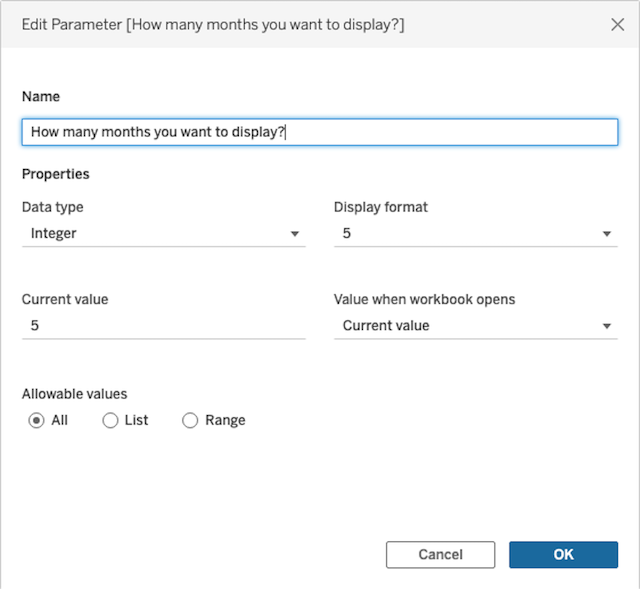
5. Right-click How many months you want to display? parameter and select Show Parameter.
Option 1
1. Create a calculated field and name it Table calculation filter.
LAST()+1 <= [How many months you want to display?]2. Add Table calculation filter to Filters and select TRUE. Right-click Table calculation filter and select Compute Using > Table(across).
Note: If you add totals and subtotals for Option 1, the Table calculation filter will not work properly. And also, the totals and subtotals values would be unexpected. This is because the table calculation filters just hide the data, and do not filter out underlying data.
Option 2
1. Create a calculated field and name it Year and Month (Concatenate).
INT(STR(YEAR([Order Date])) + RIGHT("00" + STR(MONTH([Order Date])),2))
2. Add MY(Order Date) to Filters and configure it as follows;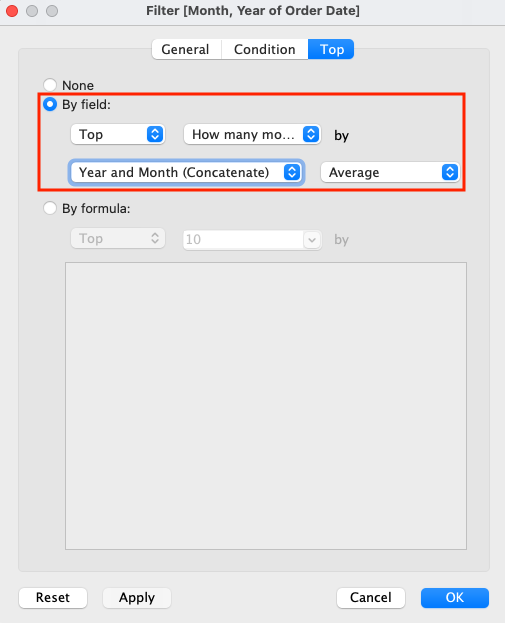
Note: Even if you add totals and subtotals for Option 2, the Top N filter will work and the totals and subtotal values will be correct, because the Top N filters do filter out the underlying data.
Дополнительные ресурсы
Номер статьи базы знаний
001468910
Эта статья решила вашу проблему?
Оставьте свой отзыв, чтобы мы могли стать лучше!
