조직 선택
How To Click One Mark To Show The Lines That Have Values Above That Mark
게시 일자: Apr 13, 2024
과업
How to click one mark to show the lines that have values above that mark?
단계
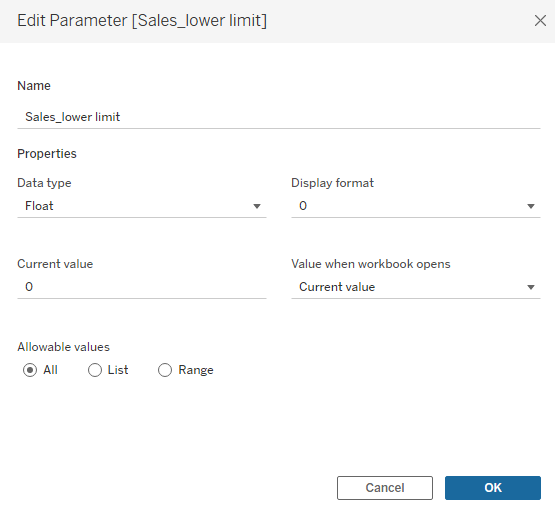
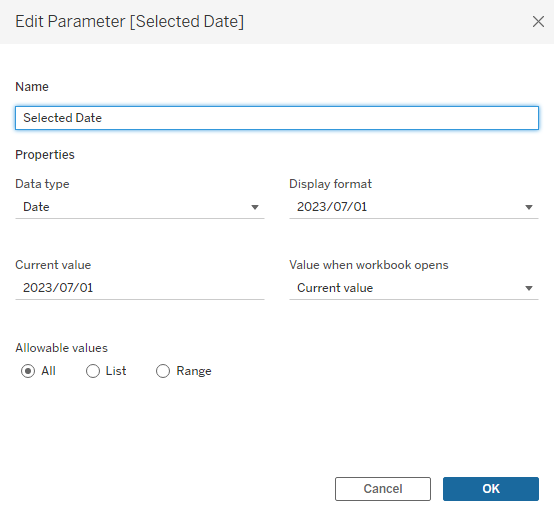
2. Right click the parameter Sales_lower limit, and select Show Parameter
3. Create the following calculation field filter
{fixed [Sub-Category]:sum(
    if DATETRUNC('month', [Order Date])=DATETRUNC('month', [Selected Date])
    then [Sales] END
)}
>=[Sales_lower limit]-1
4. Add filter to the Filters card, and select True
5. Select from the menu bar Worksheet > Actions... > Add Action > Change Parameter..., add the following 2 actions.
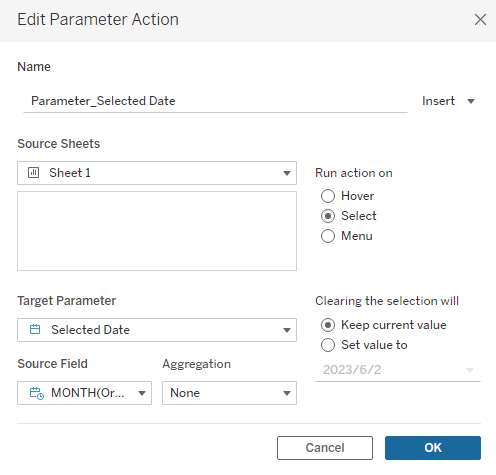
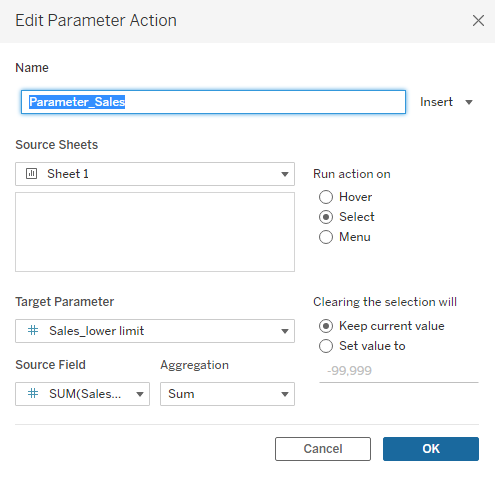
6. Select a mark in the line graphs, confirm only the lines with marks above the selected mark in that month are shown in the view.
*To reset the view, please enter a value that's lower than the lowest value in parameter Sales_lower limit.
Knowledge 기사 번호
001468995
이 기사를 통해 문제를 해결했습니까?
개선을 위한 의견을 보내주세요.
