Vælg en organisation
How to Add Average Line to the Bin Axis
Udgivelsesdato: Feb 23, 2025
Opgave
How to add average line to the bin axis?
Trin
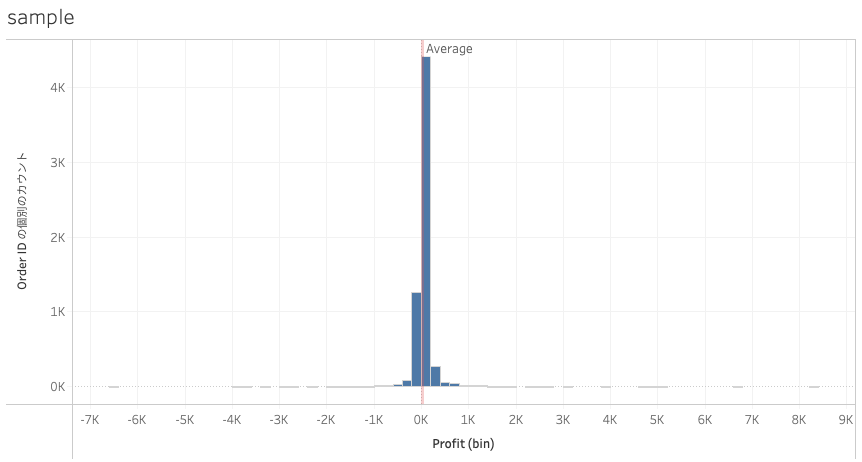
1. Add Continuous Profit(bin) to Columns.
2. Add CNTD(Order ID) to Rows.
3. Add SUM(Profit) to Columns.
4. Right-click SUM(Profit) and select Dimension.
5. Right-click Profit and select Dual Axis.
6. Right-click X axis and select Synchronize Axis.
7. Right-click the upper X axis and select Show Header.
8. Open Profit(bin) in Marks card and change the graph type to Bar.
9. Open Profit in Marks card. Click Color and change Opacity to 0%.
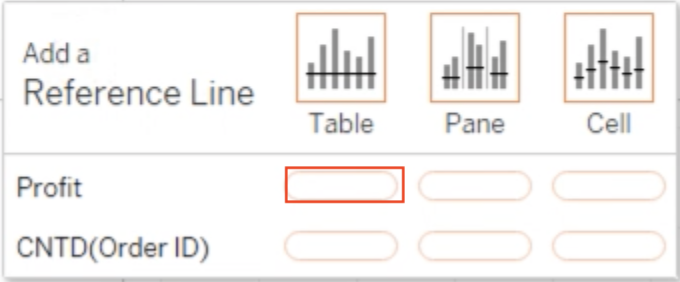
10. Open Analytics pane and drop the Average Line to the following target area.
Vidensartikelnummer
001469436
Løste denne artikel dit problem?
Giv os besked, så vi kan forbedre os!
