Seleziona un'organizzazione
How to Round Down Numbers At Decimal Points in Tableau Desktop
Data pubblicazione: Apr 13, 2024
Operazione
When the result of multiplication results in a decimal point, how to display it by truncating.
Example:
$3456.15 → 3456 OR $3456.15 → 3456.1
$3456.87 → 3456 OR $3456.87 → 3456.8
Fasi
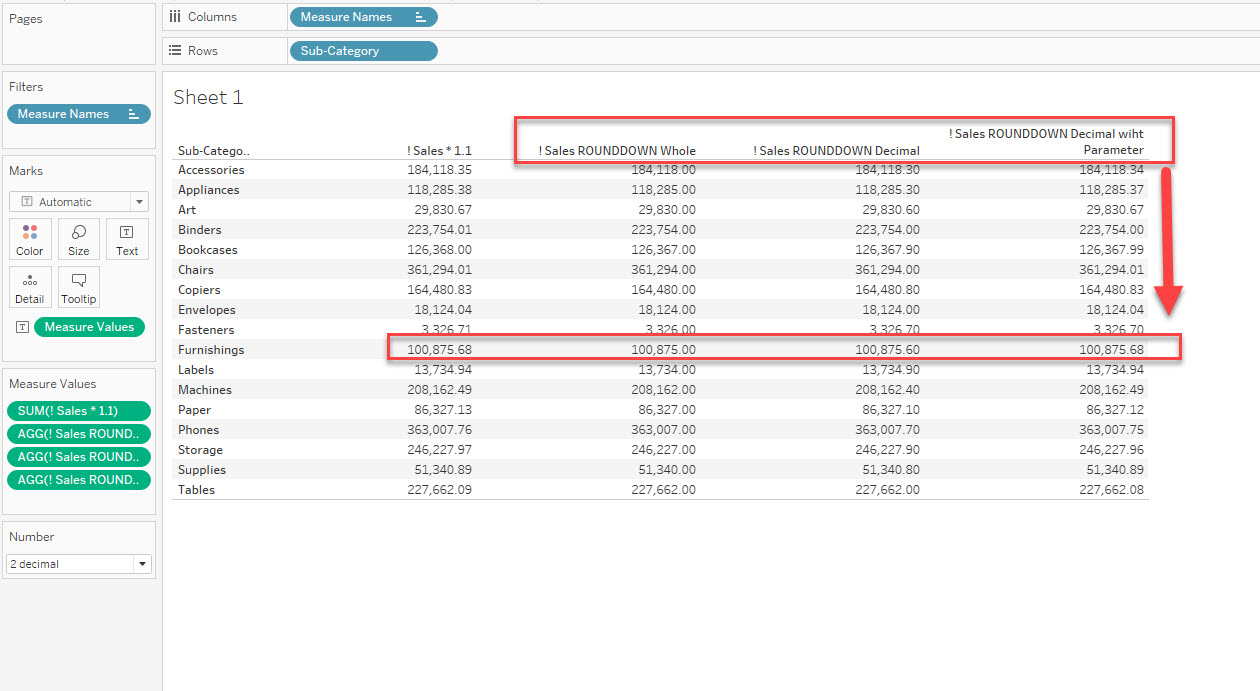
Without Parameter (Not able to specify the decimal point):
- Round down to the whole number: FLOOR(SUM([Sales])) OR FLOAT(INT(SUM([Sales)))
- Round down with decimal point: FLOAT(INT(SUM([Sales])*10)/10)
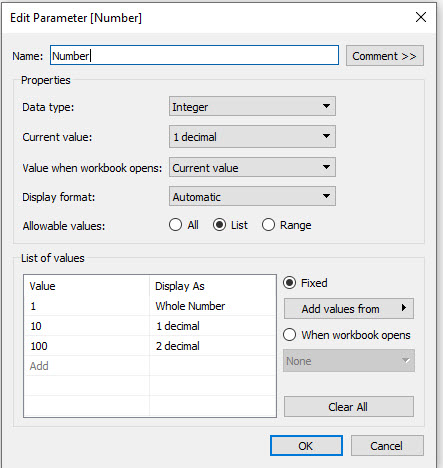
- FLOAT(INT(SUM([Sales])*[Number])/[Number])
- The parameter setting is as follows:
Risorse aggiuntive
Number Functions
Existing ROUND function only rounds up the numbers and not round off/down.
Existing FLOOR function round off/down the numbers only to an integer and there is no option to specify the decimal points.
Numero articolo Knowledge
001469829
Questo articolo ha risolto il problema?
Facci sapere, così possiamo migliorare!
