Seleziona un'organizzazione
How to Set Custom Color Palette Code (in Hexadecimal Value or Rgb Format)
Data pubblicazione: Feb 24, 2026
Operazione
How do I set the custom palette in RGB or hexadecimal format in Tableau Desktop?
Fasi
For RGB format:
- rgb(0,0,0) -- Lower case, should not be upper case.
- #E9C032 (#RRGGBB)
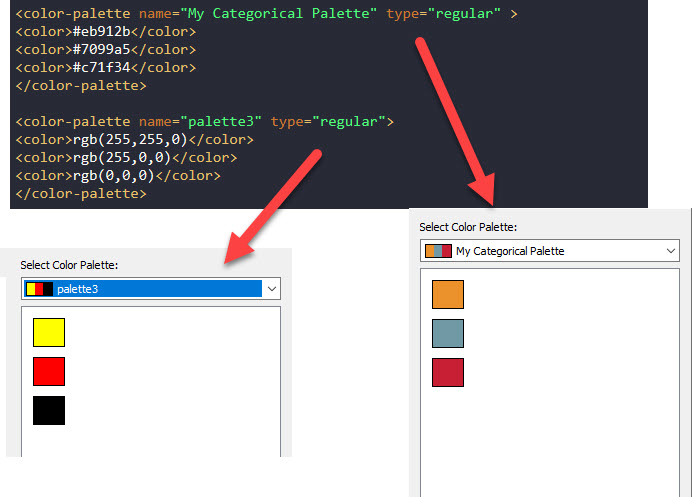
You can find out the RGB color code for certain colors here.
Please check the attached Preferences.tps file for details or put the file in [\Documents\My Tableau Repository] folder for testing. Attachments are on the right-side of the article window.
Numero articolo Knowledge
001469908
Questo articolo ha risolto il problema?
Facci sapere, così possiamo migliorare!
