Выбрать организацию
How to Set Custom Color Palette Code (in Hexadecimal Value or Rgb Format)
Дата публикации: Feb 24, 2026
Задача
How do I set the custom palette in RGB or hexadecimal format in Tableau Desktop?
Действия
For RGB format:
- rgb(0,0,0) -- Lower case, should not be upper case.
- #E9C032 (#RRGGBB)
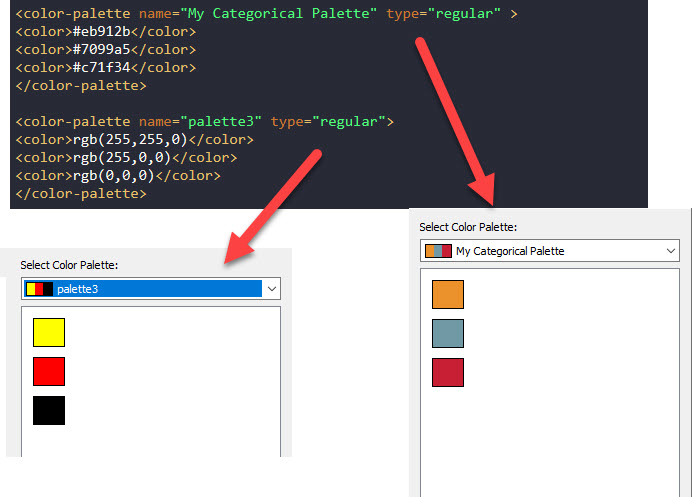
You can find out the RGB color code for certain colors here.
Please check the attached Preferences.tps file for details or put the file in [\Documents\My Tableau Repository] folder for testing. Attachments are on the right-side of the article window.
Дополнительные ресурсы
Create Custom Color Palettes
Colors RGB
How to get RGB Codes for Palette Colors
Номер статьи базы знаний
001469908
Эта статья решила вашу проблему?
Оставьте свой отзыв, чтобы мы могли стать лучше!
