Sélectionner une organisation
How to Show Continuous Number in Axis When There Are No Records(Null) for These Numbers
Date de publication: Apr 28, 2025
Tâche
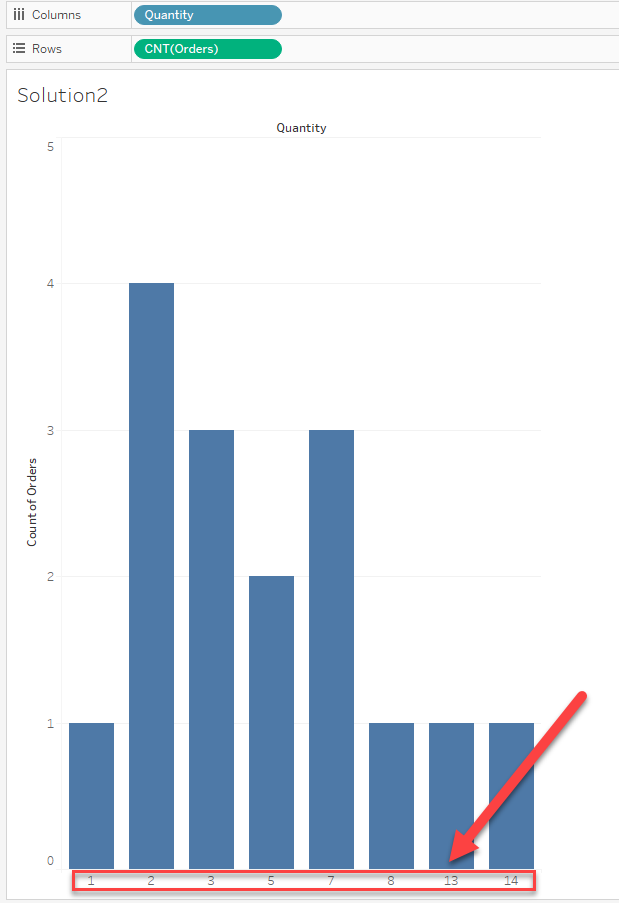
How to show continuous numbers in the Axis when there are no records(NULL) for these numbers.
For example, the below x-axis misses some value between 1~14. How to show all the numbers between 1~14.
Étapes
Option 1:
Use the [Analysis] > [Table Layout] > [Show Empty Columns] function.
If there are any numbers that are not displayed in Solution 1, please refer to Option 2.
Option 2:
Create a bin field for the field in axis and add it to the view as an axis
When creating the bin field, you can set the bin size to "1" to create a bin separated by one unit.
Please check the attached workbook and video for details.
Numéro d’article de la base de connaissances
001470504
Cet article a-t-il résolu votre problème ?
Dites-nous ce que nous pouvons améliorer !
