Vælg en organisation
How to add subtotals when "add all subtotals" is greyed out
Udgivelsesdato: Apr 13, 2024
Opgave
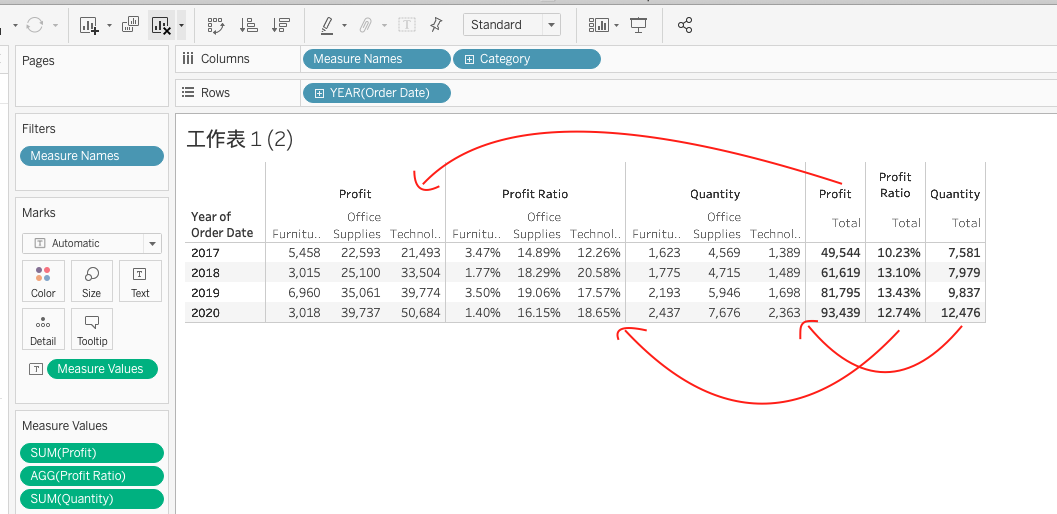
When there is only one dimension (besides the date dimension), "Add all subtotals" is greyed out. "Show Row Grand Totals" can only show the aggregated value at the end of the table.
How can I add the subtotals when "add all subtotals" is greyed out.
Trin
1. Drag "Measure Names", "Category" to the columns shelf, "Order Date" to the rows shelf
2. Drag "Measure Values" to the text mark, only keep SUM(Profit), AGG(Profit Ratio), SUM(Quantity)
3. Change the format of AGG(Profit Ratio) to show two decimal places
4. In the columns shelf, right-click-> new calculation -> type ""
5. Place this calculated field in front of "Measure Names" in the Columns pill (see the attached video).
6. Click Analysis->Totals->Add All Subtotals
7. Hide ""/ Category header
Vidensartikelnummer
001470508
Løste denne artikel dit problem?
Giv os besked, så vi kan forbedre os!
