Seleccionar una organización
Project Structure Of Admin Insights’ Site Content Data Source
Fecha de publicación: Feb 21, 2025
Tarea
How can I create my own custom Project structure using Admin insights on Tableau Cloud? I don't understand the structure of the Admin Insights' Site Content data structure.
Pasos
There are multiple ways to use the project structure provided in Site Contents. After a quick review of the fields provided, we will describe the options available below.
The data source provides multiple fields that are helpful for understanding the Project Structure.
- Item ID: The ID of the item. The ID is unique within each Item Type and Site.
- Item Parent Project Name: The name of the Top Parent Project the item ultimately resides in. Will be NULL for Top Parent Projects.
- Item Parent Project ID: The Item ID of this item’s Parent Project.
- Project Level: The level of the Project within it’s hierarchy.
- 0 = Top-level project
- 1 = A project whose parent is a top-level project
- 2 = A project whose parent’s parent is a top-level project
- Etc.
- Top Parent Project Name: The name of the Top Parent Project the item ultimately resides in. Will be NULL for Top Parent Projects.
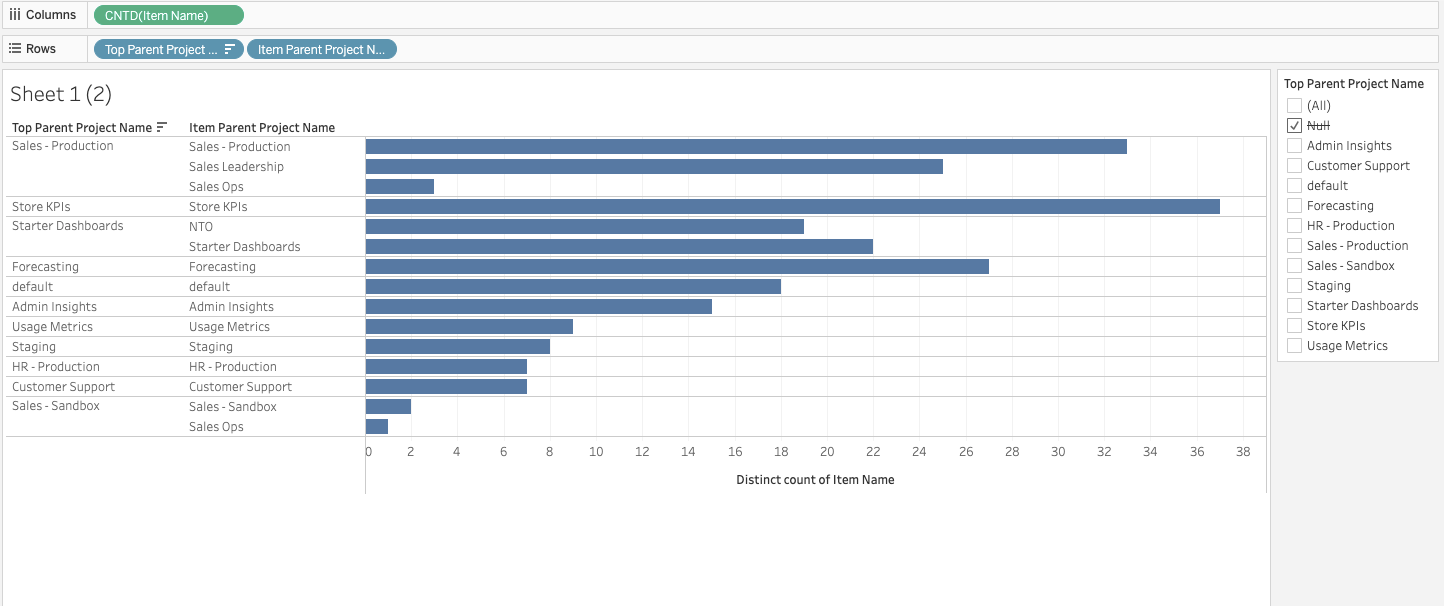
Option 1: Use Parent Projects to outline the overall Project hierarchy.
Use this option if all of your content exists within the first or second level of the Project hierarchy (Project Level = 0 or Project Level =1) OR if you want to answer questions like
- What Top-Level Projects contain the most content?
- What Projects have the most Nested Projects within them?
The example view below represents the number of content items within each Top Parent Project and in its corresponding Nested Projects. If the Top Parent Project Name is the same as the Item Parent Project Name, that means the content item lives in the Top Parent Project itself, and not in a Nested Project.
Option 2: Use Tableau Prep to create a field for each Project Level that exists on your site.
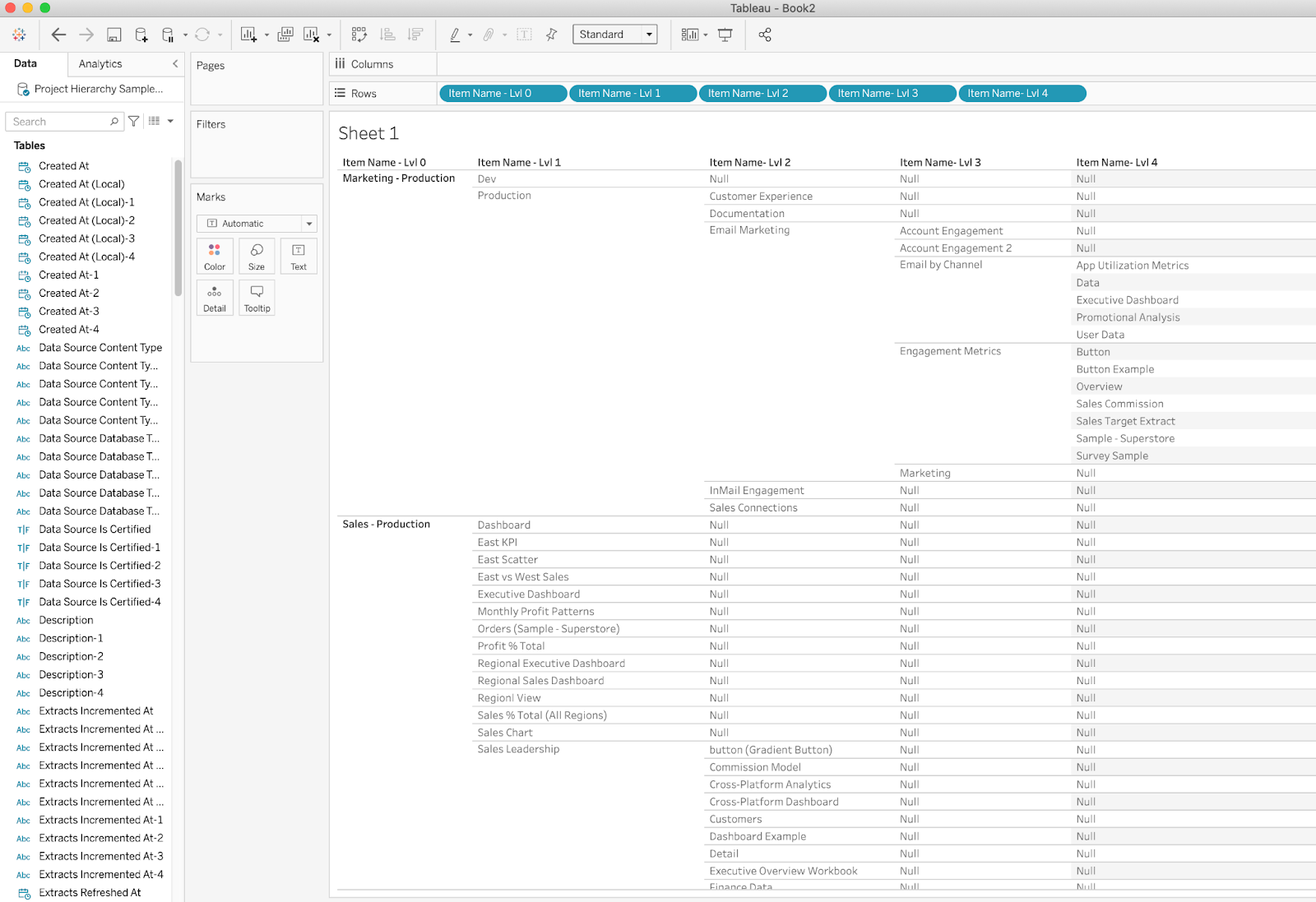
Use this option if your content has a Project hierarchy that utilizes multiple layers of Nested Projects (Project Level >=2) and you want to know the full hierarchy of what Items belong in which Projects.
This Option will provide you with a data source that provides a field for each Level that an item exists in, starting with the Top Level Project.
Use Tableau Prep to join Site Content to itself and create a unique Dimension for every Project Level that exists in your content structure (Project Level 0, 1, 2, 3, 4, etc). You will need to join the data source to itself once for every Level that you wish to drill down into the content hierarchy. Download this sample Prep Flow to see an example with sample data that contains content to 4 Project Levels.
Drawbacks:
- Fields will duplicate, and each duplicate will only apply to the Items at that Item’s Level.
- No easy way to understand details about Content Items due to duplication of fields.
- Use Option 1 to understand content-specific details.
Option 3: Use Tableau Prep to create a project hierarchy for each item on your site.
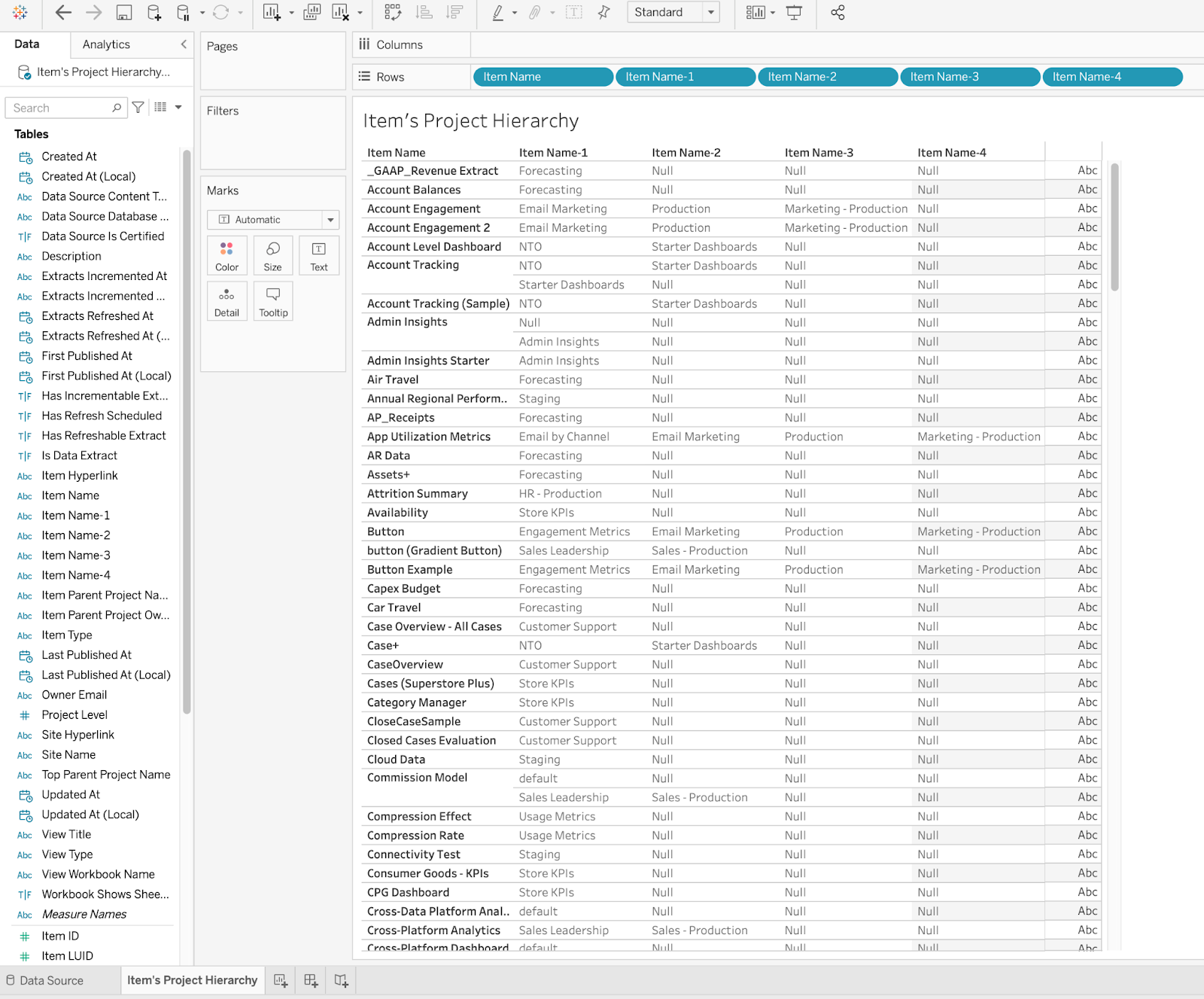
Use this option if your content has a Project hierarchy that utilizes multiple layers of Nested Projects (Project Level >=2) and you want to understand the project hierarchy of a specific item.
This Option will provide you with a data source that provides a field for each Level that an item exists in, starting with the Item itself.
Use Tableau Prep to join Site Content to itself and create a unique Dimension for every layer of Project that Items exist within in your Site. (Project Level 0, 1, 2, 3, 4, etc). You will need to join the data source to itself once for every Level that you wish to drill up into an Item’s hierarchy. Download this sample Prep Flow to see an example with sample data that contains content to 4 Project Levels.
Drawbacks:
- Projects at the same Level may appear in different fields due to the fact that one Project may have more Nested Projects than the other
- Difficult to identify how many content items exist within a Project
- Use Option 2 for these answers
Recursos adicionales
Número del artículo de conocimiento
001470527
¿Resolvió este artículo su problema?
¡Háganos saber cómo podemos mejorar!
