Sélectionner une organisation
How To Hide The "Data Details" In The Toolbar Above The Workbook Or Dashboard View
Date de publication: Apr 24, 2025
Tâche
How to hide the "Data Details" in the toolbar above the workbook or dashboard view?

Étapes
Workaround 1:
Add "?:dataDetails=no" to the end of view URL, or use the "dataDetails" object parameters with value "no" to embed views into webpages .
Note: The embed code for Tableau Server 2022.3 and later and Tableau Cloud has changed to use the Embedding API v3. For a current list of classes and methods in the Embedding API v3, see the Embedding API Reference in the Embedding API help.
Example:
Workaround 2:
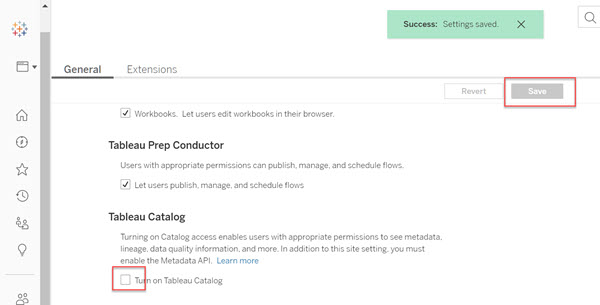
(For Tableau Server) Turn off Catalog capabilities for each site. For more information see Disable Catalog.
Note: When disabling Catalog, it may be necessary to wait a few minutes or to sign out for the change to appear.

Ressources supplémentaires
"Data Details" is automatically displayed as a feature of Tableau Catalog after applying for the Data Management Add-on license and Turning on Tableau Catalog.
Numéro d’article de la base de connaissances
001470534
Cet article a-t-il résolu votre problème ?
Dites-nous ce que nous pouvons améliorer !
