Organisation auswählen
How to List all the Workbooks in Users' Personal Space in a Site
Veröffentlichungsdatum: Apr 7, 2026
Aufgabe
How to show all the workbooks in users' personal space via the Tableau Server or Tableau Cloud web user interface (UI)?
Schritte
1, Sign in to Tableau Server or Tableau Cloud as a Site Administrator (or Server Administrator if you are using Tableau Server).
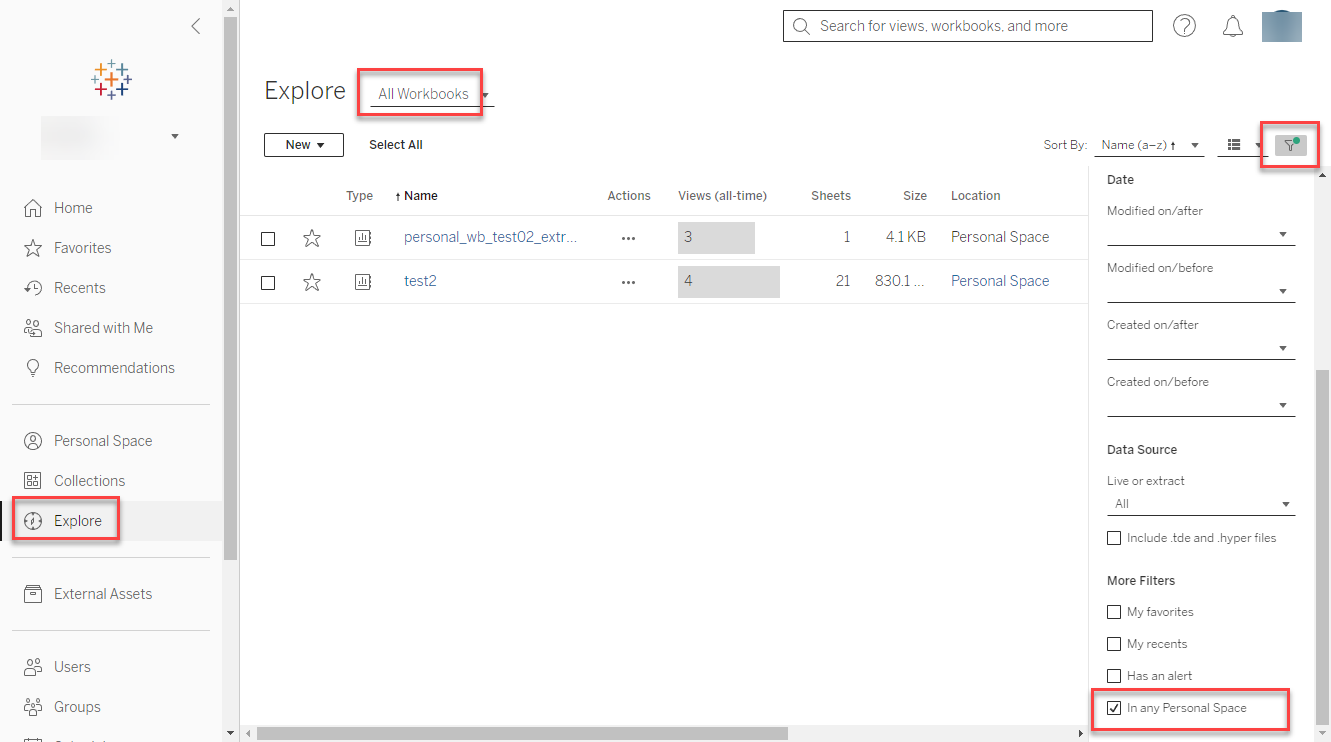
2, Click Explore then Select All Workbooks.
3, Click the Filter located on the upper right section of the screen, then just check the filter In any Personal Space.
Zusätzliche Ressourcen
Nummer des Knowledge-Artikels
001470585
Konnten Sie Ihr Problem mithilfe dieses Artikels lösen?
Geben Sie uns Feedback, damit wir uns verbessern können.
