Velg en organisasjon
How to deploy Tableau Pulse in Tableau Cloud
Publiseringsdato: Feb 17, 2025
Oppgave
Trinn
The default setting for deploying Tableau Pulse off by default. When enabling Tableau Pulse, you have the option to activate it for a specific user group or for all users across your site. A controlled rollout is possible by initially turning it on for a select group, allowing a subset of users to explore and evaluate it before making it available to the entire organization. For more information see the Tableau Online Help, Deploy Tableau Pulse for your site.
Please follow the steps below:
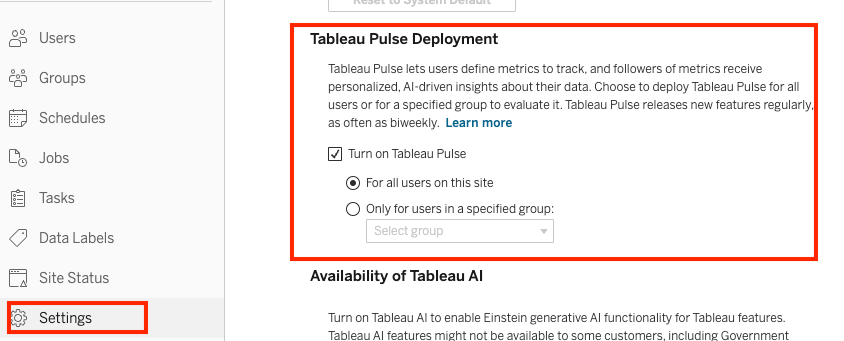
2. Under Tableau Pulse Deployment, select the option to Turn on Tableau Pulse.
3. Choose whether to activate Tableau Pulse for all users or a designated user group. If opting for a specific group, select the desired group.
4. Click Save to apply the changes.
Knowledge-artikkelnummer
001470601
Hjalp denne artikkelen med å løse problemet ditt?
La oss få vite det slik at vi kan forbedre!
