組織を選択
Mongo DB Connection Fails with Error "The drivers required to connect to the data source are not installed." After Upgrading or Installing Tableau Server 2023.3.1
公開日: Jan 24, 2025
説明
Issue
After Tableau Server has been installed or upgraded to version 2023.3.1, MongoDB BI Connector connections fail with the error:
"The drivers required to connect the data source are not installed".
Error encountered when attempting to load a view connecting to MongoDB: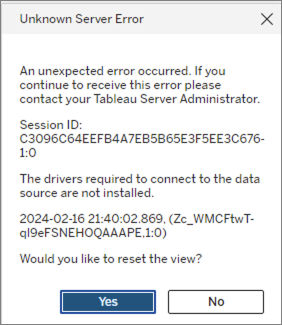
Also creating a new connection to a published MongoDB data source fails with the error:
"The driver required to connect to the data source isn't installed. Contact your Tableau Server Administrator.
Cause
This is a known issue with driver fallback on MySQL and Mongo DB that is fixed in more recent version of Tableau Server.
解決策
Option 1
Upgrade to Tableau Server to 2023.3.2 or later.
Option 2: Install the MongoDB BI Connector ODBC Driver
Linux(RHEL/CentOS)
1. On the Github driver download page, select the link containing the version compatible with your operating system.
2. Download command using the link for MongoDB 1.4.5 ODBC Drivers for Linux(RHEL 7)
wget https://github.com/mongodb/mongo-bi-connector-odbc-driver/releases/download/v1.4.5/mongodb-connector-odbc-1.4.5-rhel-7.0-64.tar.gz
3. Unzip the downloaded ODBC package.
tar -xzvf mongodb-connector-odbc-1.4.5-rhel-7.0-64.tar.gz
4. Copy the contents within the extracted folder to the /usr/local/lib directory
cd mongodb-connector-odbc-1.4.5-rhel-7.0-64/
sudo cp lib* /usr/local/lib
6. Edit the /etc/odbcinst.ini file and add the following contents within.
[MongoDB ODBC 1.4.5 Unicode Driver]
DESCRIPTION = ODBC for MongoDB BI Connector
DRIVER = /usr/local/lib/libmdbodbcw.so
Windows Server
1. Verify the supported platform on the MongoDB BI Connector ODBC Driver website.
2. On the Github driver download page, download the 64-bit msi installer link.
3. Install the mongodb-connector-odbc-<version>-win-64-bit.msi file following the setup wizard.
ナレッジ記事番号
001470900
この記事で問題は解決されましたか?
ご意見をお待ちしております。
