Seleccionar una organización
Error "OAUTH_APP_ACCESS_DENIED (errorCode=180002)" When Attempting to Publish Tableau Views to Salesforce
Fecha de publicación: Apr 13, 2024
Descripción
Issue
The following error occurs after attempting to "publish to Salesforce" from Tableau Server.
OAUTH_APP_ACCESS_DENIED (errorCode=180002)
Cause
Incorrect OAuth Policies configuration in Salesforce side.
Solución
-
Sign in to Salesforce CRM as an administrator.
-
Go to Setup > Platform Tools > Apps > Connected Apps > Managed Connected Apps.
-
On the Connected Apps page, select the app that is used
-
Select Edit policies.
-
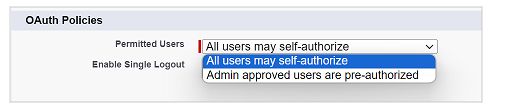
Under OAuth Policies, select one of the following values for Permitted Users:
-
All users may self-authorize: This option allows any authenticated Salesforce user to connect to the Salesforce instance through Tableau to gain access to Salesforce, this the option that need to be selected to resolve the issue.
Recursos adicionales
Número del artículo de conocimiento
001470949
¿Resolvió este artículo su problema?
¡Háganos saber cómo podemos mejorar!
