Välj en organisation
Unable to Browse to SSL Certificate in Tableau Prep Builder When Connecting to Hortonworks Hadoop Hive
Publiceringsdatum: Mar 19, 2026
Beskrivning
When connecting Tableau Prep to an SSL-enabled Hive server, the following error may occur:
[Hortonworks][DriverSupport] (1100) SSL certificate verification failed because the certificate is missing or incorrect.
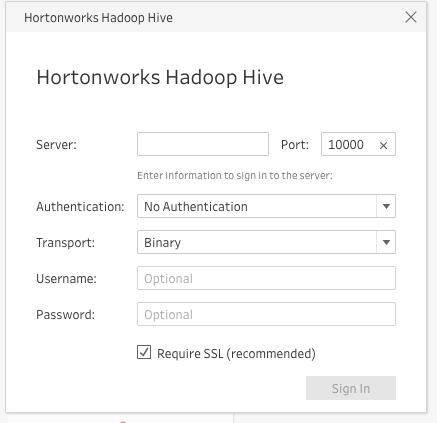
Additionally, there is no option to browse to an SSL certificate file from the data connection dialog in Tableau Prep Builder.
Cause
Currently there is no option to browse to an SSL certificate from the data connection dialog in Tableau Prep Builder.
Lösning
The following options need to be performed with the help of your IT team:
Option 1
Apply the attached .tdc file on the Tableau Prep computer:
- Open the .tdc file in a text editor, such as Notepad, replace {filepath} with the file path for the trusted certificate file, and then save the changes.
- Copy the edited .tdc file to Documents\My Tableau Prep Repository\Datasources
- Restart Tableau Prep to apply the change.
Note: If you’re not sure where the Tableau Prep repository is located, open Tableau Prep and select File > Repository Location.
Option 2
Install the required root certificate on the computer where Tableau Prep is installed:
Windows:
-
Verify that the SSL Certificate Chain File is configured in Tableau Server.
-
Copy the certificate file (.crt) to the computer running Tableau Prep.
-
Double-click the certificate file, click Install Certificate, and then click Next.
-
Select Place all certificates in the following store.
Browse to select Trusted Root Certification Authorities and then click OK > Next > Finish.
-
Wait for the certificate to finish importing, then click OK.
You can verify that there are no duplicate certificates for Tableau Server CA in the Windows certificate store with the steps below:
-
From the Start menu, type
certmgr, then open Manage computer certificates. -
Navigate to Trusted Root Certification Authorities> Certificates.
-
If there are duplicate certificates for Tableau Server, open each one and check the Serial number on the Detailstab.
-
Delete all the Tableau Server certificates with serial numbers that don't match the correct Tableau Server certificate.
-
Follow steps 3 and 4 for any duplicate Tableau Server certificates in Intermediate Certification Authorities > Certificates.
Mac OS X:
-
Verify that the SSL Certificate Chain File is configured in Tableau Server.
-
Add the root certificate to your computer's keychain to ensure that the certificate authority is trusted by your computer.
- Double click the certificate file (with ".cer" extension).
-
Choose "System" from the keychain option. Then press "OK".
-
In the following pop-up window, click the "Always Trust" button.
- Then you will notice that the certificate is added to the system entry.
Knowledge-artikelnummer
001471252
Löste denna artikel ditt problem?
Berätta för oss vad vi kan förbättra!
