Valitse organisaatio
Login Fails or Login Prompt Continuously Appears in Embedded View with Safari
Julkaisupäivä: Apr 13, 2024
Kuvaus
When accessing an embedded view using Safari web browser, the login prompt may continue to appear even after credentials have been provided. The following error may occur:
Refused to display
Cause
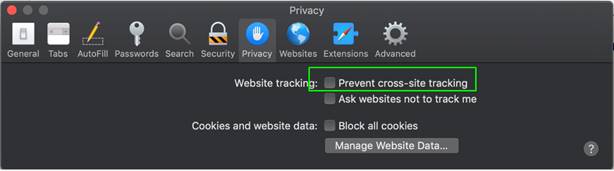
The option to "Prevent cross-site tracking" in Safari is enabled by default and can interfere with login and display of an embedded view.Ratkaisu
Lisäresurssit
Knowledge-artikkelin numero
001471309
Ratkaisiko tämä artikkeli ongelmasi?
Anna palautetta, jotta voimme kehittyä!
