Sélectionner une organisation
Error Code BC42EF73 Connecting To PostgreSQL via Proxy Server After Updating To Tableau Desktop 2020.4 and Newer Versions
Date de publication: Dec 26, 2025
Description
When attempting to connect to a PostgreSQL database in Tableau Desktop 2020.4 or newer, in an environment where a proxy server is enabled, the following error occurs:
Unable to connect to the server. Check that the server is running and that you have access privileges to the requested database.
Error Code: BC42EF73
The connection attempt failed.
Unable to connect to the PostgreSQL server '<server-address>'. Check that the server is running and that you have access privileges to the requested database.
Error Code: BC42EF73
The connection attempt failed.
Unable to connect to the PostgreSQL server '<server-address>'. Check that the server is running and that you have access privileges to the requested database.
Cause
Starting in version 2020.4, Tableau uses JDBC by default when connecting to PostgreSQL instead of ODBC. JDBC drivers can have trouble interpreting proxy settings which leads to a connection failure.
The Postgres host Azure blocks the connection.
Résolution
Option 1
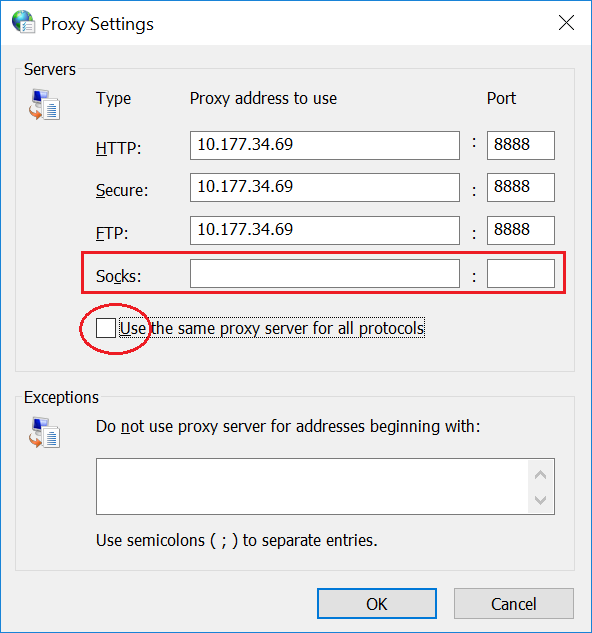
If your proxy server does not support SOCKS protocol, disable "Use the same proxy for all protocols" and make sure Socks protocol fields are blank.
Option 2
If the database address is added to the exceptions list for the proxy server, do not use wildcards - specify the full IP address or FQDN.
Option 3
Connect to the database using ODBC instead of JDBC. Remove the PostgreSQL JDBC driver from 'C:\Program Files\Tableau\Drivers' and Tableau will fallback to using ODBC with the native PostgreSQL connector.
Ressources supplémentaires
Tableau Fails To Connect to Amazon Athena through Proxy With Error Code 37CE01A3
Numéro d’article de la base de connaissances
001471361
Cet article a-t-il résolu votre problème ?
Dites-nous ce que nous pouvons améliorer !
