Välj en organisation
Tableau Prep Cannot Connect to Tableau Cloud When Proxy is Configured
Publiceringsdatum: Feb 20, 2025
Beskrivning
Cause
Tableau Prep's Java is not using the system proxy.Lösning
First, upgrade Tableau Prep to 2018.1.2 or a newer version. Click here for downloads of Tableau Prep: Tableau Prep Downloads and Release Notes. For more information on current releases, see Install Tableau Prep and Prep Upgrade.
Option 1
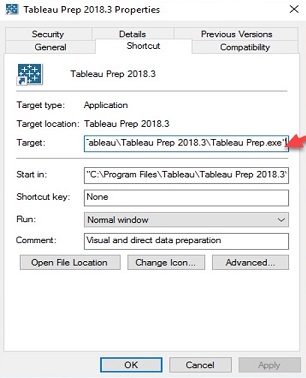
Edit the Tableau Prep shortcut to include the proxy information.
- If necessary, create a shortcut of Tableau Prep by right-clicking Tableau Prep.exe and selecting Create Shortcut.
- Right-click the Tableau Prep shortcut and select Properties.
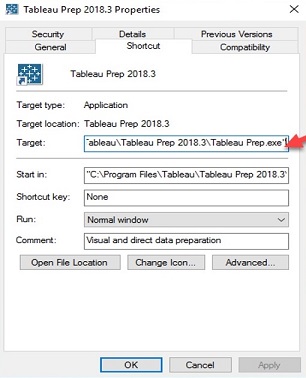
- Under "Target", append the following after "Tableau Prep.exe", replacing values for DproxyHost and DproxyPort with the appropriate values for your environment:
--java-options=-DproxySet=true;-DproxyHost=127.0.0.1;-DproxyPort=8888
Option 2:
Launch Tableau Prep using the below command:C:\Program Files\Tableau\Tableau Prep 2018.1.2\"Tableau Prep.exe" --java-options=-DproxySet=true;-DproxyHost=127.0.0.1;-DproxyPort=8888
Replace the values for proxy host and port as necessary.
Note: Option 1 is only permanent as long as you are running a particular version of Prep. If you upgrade to a new version, such as 2019.1.1, you will need to re-edit the shortcut again.
See screenshot below.
Ytterligare resurser
Knowledge-artikelnummer
001471524
Löste denna artikel ditt problem?
Berätta för oss vad vi kan förbättra!
