Sélectionner une organisation
Flow Job Pending with "cannot run because your site has reached its concurrency limit for extract refreshes"
Date de publication: Feb 19, 2025
Description
Unable to run a published flow in Tableau Cloud when you set the schedule for running flow.
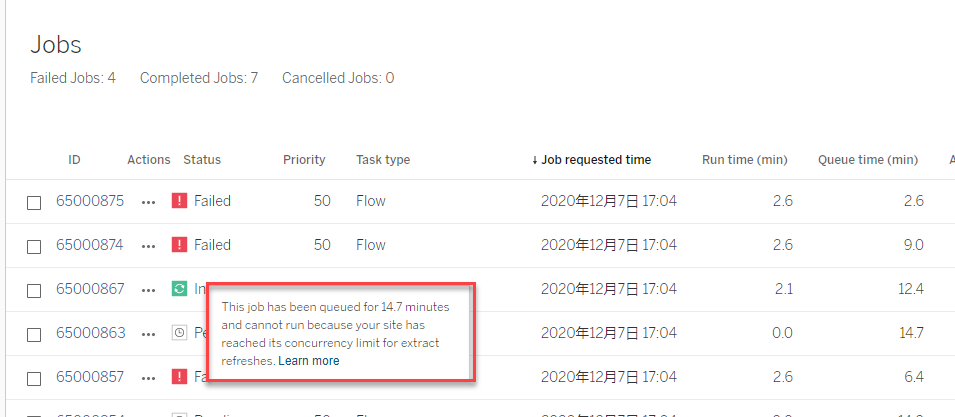
The flow job is pending with the following message:
"This job has been queued for XX minutes and cannot run because your site has reached its concurrency limit for extract refreshes"
Cause
For Sites With Data Management
This error can occur when you try to schedule more flows than the number of Resource Blocks you have.
-
- You can schedule 1 flow for 1 Resource Block. NOTE: One Resource Block is required when purchasing a Data Management Add-On license.
- You can run flows for up to 24 hours per day per Resource Block. If you exceed the time limit no new jobs can be started until the next day. Additional capacity for concurrent flow jobs can be purchased. For more information, see Resource Blocks
For Sites Without Data Management
- If not licensed with Data Management, a site has a default capacity of 1 concurrent flow job, which is the equivalent of having one Resource Block. If there are no Resource Blocks available when a flow job starts, the job goes into a queue to wait for a Resource Block to be available. Additional capacity for concurrent flow jobs can be purchased. See Concurrent Jobs Capacity for more information
- For sites that don’t have Data Management, the maximum runtime for flows jobs for a site is 60 minutes times the number of creator licenses up to a maximum of 24 hours. If your site has large flows workloads, consider purchasing Data Management to get more capacity. See Job Runtime Capacity Product Help page for more information
Résolution
For Sites With Data Management
Option 1
- Add buffers to your flow schedules to reduce flows running concurrently.
Option 2
- Run your flow tomorrow (if you've run out of flow-hours for the day)
Option 3
- Purchase additional resource blocks.
For Sites Without Data Management
Option 1
- Run/schedule the flows one at a time.
Option 2
- Purchase Data Management Add-On to add additional resource blocks.
Ressources supplémentaires
Managing Background Jobs in Tableau Cloud
Resource Blocks
License the Data Management Add-on
Job Runtime Capacity Product Help page
See also Prep Flow Jobs Intermittently Show Pending Status Longer than Expected in Tableau Cloud
Numéro d’article de la base de connaissances
001471717
Cet article a-t-il résolu votre problème ?
Dites-nous ce que nous pouvons améliorer !
