Velg en organisasjon
Error "SSLHandshakeException PKIX path building failed" When Connecting to Google Analytics
Publiseringsdato: Apr 30, 2025
Beskrivelse
When connecting Tableau Desktop to Google Analytics or Google BigQuery, the following error may occur:
Authentication failed
Error code: 84223ADA
SSLHandshakeException PKIX path building failed: sun.security.provider.certpath.SunCertPathBuilderException: unable to find valid certification path to requested target
Cause
Tableau Desktop may be unable to connect to oauth2.googleapis.com because of SSL inspection (or HTTPS interception).Løsning
Work with your IT team to add oauth2.googleapis.com to the bypass or exception list for SSL inspection.
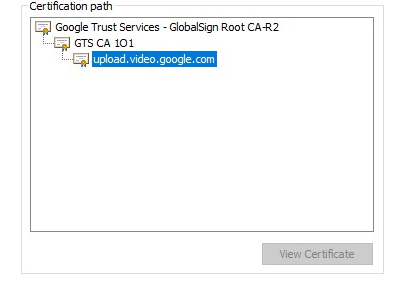
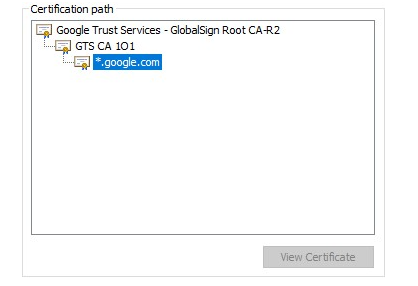
To check for SSL interception, carry out the following steps to check the certification paths for https://www.googleapis.com/ and https://accounts.google.com/
- In the Google Chrome browser, go to https://www.googleapis.com/
- Click the padlock icon in the web address bar > Certificate > Certification Path tab.
- Compare the certification path against that in the screenshot below.
- Repeat Steps 1 to 3 for https://accounts.google.com/
Knowledge-artikkelnummer
001471746
Hjalp denne artikkelen med å løse problemet ditt?
La oss få vite det slik at vi kan forbedre!
