Выбрать организацию
Data Update Time Displaying Incorrect Timezone When Published to Tableau Cloud or Tableau Server
Дата публикации: Feb 25, 2026
Описание
After publishing a workbook which utilizes the Tableau Data Update Time feature, the incorrect time-zone is displayed.
Cause
For workbooks published to Tableau Server or Tableau Cloud, the Data Update Time will use the system time from the operating system on the computer hosting Tableau Server/Tableau Cloud.
Решение
For the Tableau published workbook using the Data Update Time that is displaying the incorrect timezone, use one of the below workaround options:
Option 1
Specify the Tableau Cloud system time-zone after the <Data Update Time> function.
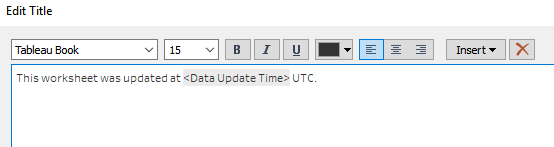
Option 2
Replace the Data Update Time function with a CURRENT_TIMESTAMP field from the dataset and calculation to specify the desired time time-zone.
- Open the workbook in Tableau Desktop
- Create a custom calculated field according to the instructions in the following article, Date Calculations, Filters, and Time Stamps Show Unexpected Results After Publishing
- Republish the workbook to Tableau Cloud.
Note: <Data Update Time> is not available to be used in a calculated field. In the above article, instead of a date field, use NOW() to approximate <Data Update Time> on a live connection. On an extracted connection, NOW() will not work as desired. However, for some data sources it may be possible to convert the connection to a custom SQL connection and add a CURRENT_TIMESTAMP field that will return the time the extract was created.
Дополнительные ресурсы
System time for each Tableau Cloud environment:
10ay: US Pacific
10az: US Pacific
US-East-1: UTC
US-East-a : UTC
US-East-b : EDT
US-West-2a : UTC
US-West-2b : UTC
Dub01: UTC
See also, Adding Data Refresh Time Stamp to a View in a Dashboard
To voice your support for the future implementation of such a feature, please vote on the following idea on the Salesforce Idea Exchange: Data Update Time - formatting and wider use.
Номер статьи базы знаний
001472096
Эта статья решила вашу проблему?
Оставьте свой отзыв, чтобы мы могли стать лучше!
