Vælg en organisation
BigQuery Public Datasets Not Listed on Tableau Data Source Page
Udgivelsesdato: Apr 13, 2024
Beskrivelse
BigQuery public datasets are not listed in Tableau Desktop.
Cause
This is the current default behavior with BigQuery public datasets.Løsning
Option 1 - Manually enter the project name
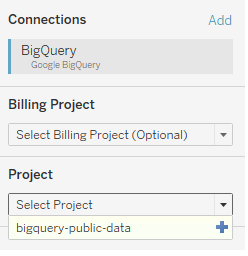
- Enter the name of the project in the drop-down menu of the Connections dialog and click the plus icon.
Option 2 - Use custom SQL
- From the Project drop-down list, select publicdata.
- From the Dataset drop-down list, select samples.
- Under Table, double-click 'New Custom SQL'.
- In the Edit Custom SQL dialog, enter a query using the syntax below and then click OK:
SELECT * FROM `project-id.dataset_name.table_name`
Vidensartikelnummer
001472182
Løste denne artikel dit problem?
Giv os besked, så vi kan forbedre os!
