Sélectionner une organisation
Unable to load ATR Message Appears when Exporting AtrOutput.txt File
Date de publication: Apr 13, 2024
Description
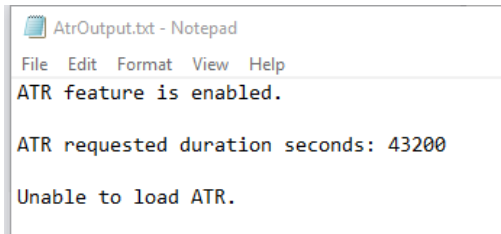
When running atrdiag.exe > AtrOutput.txt from the command line, the output of the command may show the "Unable to load ATR" message even though the ATR feature shows "enabled".
Cause
ATR information is not loaded until the Tableau activation is completed.If Virtual Desktop or LBLM is already set up, but the ATRdiag.exe output shows the "Unable to load the ATR" on the "ATR is enabled" message, as shown in the "Issue" statement above, simply activate the product using your preferred method, either LBLM or a product key.
If this is a new VM or machine where the LBLM activation has failed or the lease has expired, the ATRDIAG output will also display no valid data.
Run the command, "atrdiag.exe -showAll" to see previous leases that have expired.
Résolution
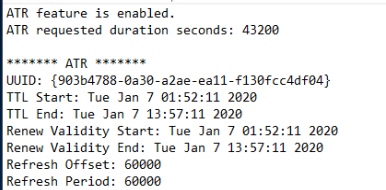
The message "Unable to load ATR" will be replaced by the ATR information. See below screenshot from Notepad of partial return output.
Ressources supplémentaires
Numéro d’article de la base de connaissances
001472197
Cet article a-t-il résolu votre problème ?
Dites-nous ce que nous pouvons améliorer !
