Sélectionner une organisation
Error "There is an error parsing Preferences.tps. [...]" After Adding Custom Colour Palette
Date de publication: Feb 23, 2026
Description
There is an error parsing Preferences.tps. This can occur if quotation marks other than basic single quotes (') or double quotes(") are used around attribute names. Until this is corrected, Tableau Desktop will use the default color palettes.
The following 1 errors occurred while parsing Preference file"C:\Users\username\Documents\My Tableau Repository\Preferences.tps":
Fatal Error(##,#): comment or processing instruction expected (id: C:\Users\username\Documents\My Tableau Repository\Preferences.tps)
Cause
There is single (') or double quotes(") incorrectly added in the Preferences.tps file.Résolution
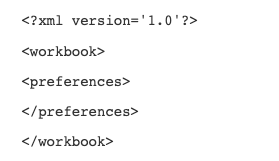
The preferences.tps file is in XML format and can be opened with any XML editor such as Notepad. The file will start with the format in the below screenshot:
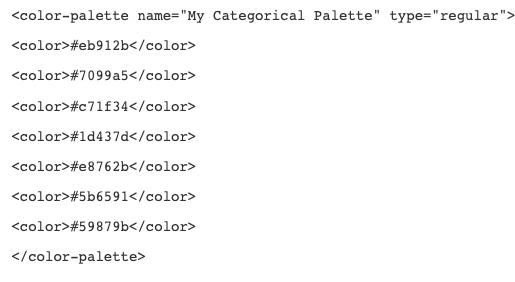
If adding a color palette, additional text will be added between the "preferences" marker as shown below and in the color-palette name and type, the quotes can be incorrectly entered. This is an example of a correct XML update:
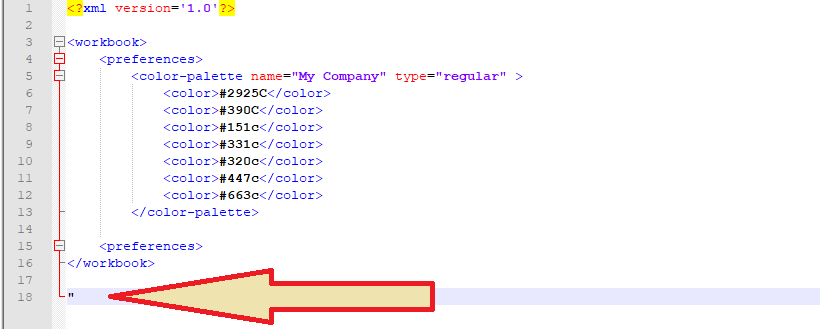
There may also be an additional stray quote as demonstrated here:
Ressources supplémentaires
Further information and screenshots on updating the Preferences file is available in the Tableau Online Help.
Numéro d’article de la base de connaissances
001472293
Cet article a-t-il résolu votre problème ?
Dites-nous ce que nous pouvons améliorer !
