Sélectionner une organisation
Date Quick Filter Not Showing Date Values In Tableau Server / Tableau Cloud
Date de publication: Feb 20, 2026
Description
After publishing the dashboard to Tableau Cloud or Tableau Server from Tableau Desktop, the date filter is not rendered as expected in Tableau Cloud or Tableau Server and the selected date values do not appear.
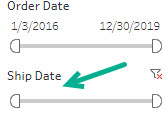
An example below is the field "Ship Date" which does not display the date range in the filter
Cause
When a Date Format of type "Custom" is chosen if there is no information provided in the format field, the dates will not display. To avoid this issue please supply a format for the Custom format or alternatively use another format.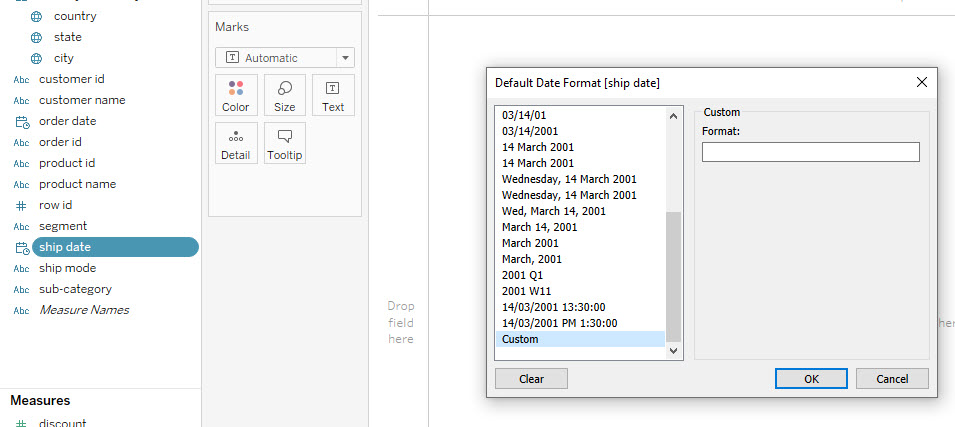
Résolution
- Open the workbook in Tableau Desktop and go to the view that contains the filter
- Select the field that the filter is using and right click the field
- Select "Default Properties -> Date Format"
- If Custom format is selected please check the format values entered and ensure it is a valid format as per our Online Help
Alternatively choose another date format such as "Automatic" and save the change and republish to Tableau Server / Tableau Cloud
Numéro d’article de la base de connaissances
001472337
Cet article a-t-il résolu votre problème ?
Dites-nous ce que nous pouvons améliorer !
