Valitse organisaatio
Tableau Fails To Connect to Amazon Athena through Proxy With Error Code 37CE01A3
Julkaisupäivä: Dec 29, 2025
Kuvaus
Cause
Tableau Desktop cannot connect to Amazon Athena through proxy server if system proxy is turned on in internet options on the Windows system. The following error occurs after 90 seconds.
An error occurred while communicating with Amazon Athena
Bad Connection: Tableau could not connect to the data source.
Error Code: 37CE01A3
Deadline Exceeded
Unable to connect to the Amazon Athena server "athena.xxxxx.amazonaws.com". Check that the server is running and that you have access privileges to the requested database.
Cause
Tableau Desktop prioritizes the system proxy setting and overrides the proxy setting in athena.properties. Tableau Desktop attempts to use Socks protocol with the above environment/configuration, and if the proxy server does not support Socks protocol, Athena JDBC driver does not work to connect to the data source. By disabling the the option "Use the same proxy for all protocols" and leaving the Socks field blank, Tableau Desktop does not try to use Socks and Athena JDBC driver works via HTTP and the connection works.
Ratkaisu
If you have configured proxy settings in athena.properties, you may need to remove those settings if you have also configured proxy settings at the OS level.
Option 1
If your proxy server does not support Socks protocol, disable "Use the same proxy for all protocols" and make sure Socks protocol fields are blank.
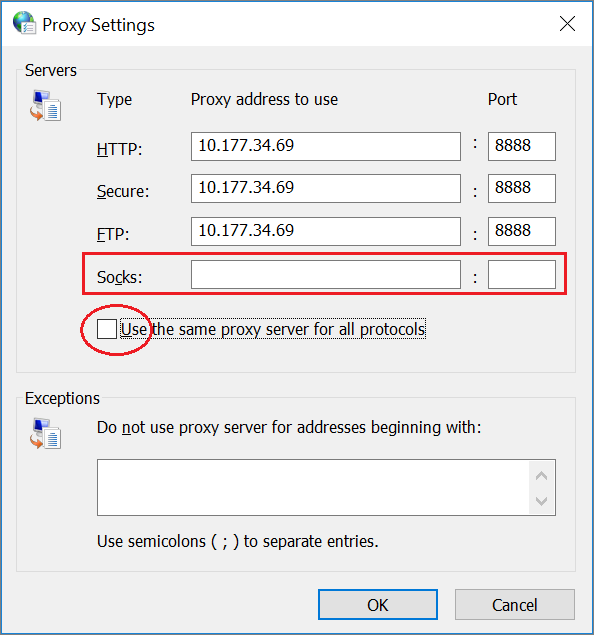
Option 2
If your proxy server does support Socks protocol, but you prefer to use HTTP proxy for Athena, configure it in athena.properties.
Add an exception for Athena to the Windows Proxy Settings.
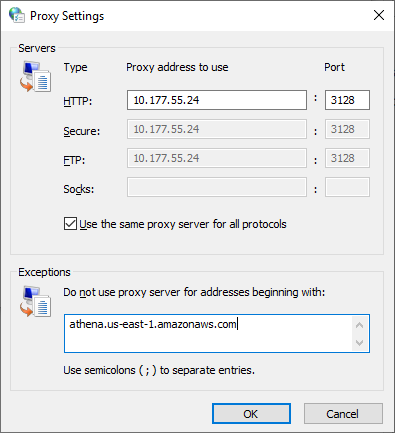
Note: The above example uses the zone for us-east-1, use the correct zone for your service. Use the full hostname without wildcards.
Lisäresurssit
A similar issue may manifest which has a different solution. See Unable to Connect to Athena Via Proxy Server for more information.
Also see:
How to connect Tableau Desktop to Amazon Athena via Proxy Server:
- Download the JDBC driver (.jar file) from the Amazon Athena User Guide on Amazon's website. Place the downloaded .jar file in C:\Program Files\Tableau\Drivers.
- Create the athena.properties file with the following content (shown below) and place it in the directory ...\My Tableau Repository\Datasources.
proxy_host=<proxy hostname or IP address>proxy_port=<the port proxy server uses>
Knowledge-artikkelin numero
001472364
Ratkaisiko tämä artikkeli ongelmasi?
Anna palautetta, jotta voimme kehittyä!
