Выбрать организацию
"Error Code AA76601F. [JDBC Driver]1 validation error detected: Value null at 'workGroup; failed to satisfy constraint. Member must not be null" Error Occurs When Creating Custom SQL for Amazon Athena
Дата публикации: Apr 13, 2024
Описание
Issue
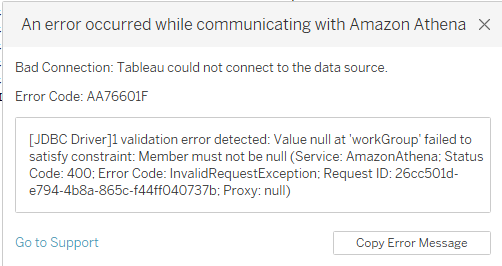
When connecting to Amazon Athena using Custom SQL, the following error occurs:
Bad Connection: Tableau could not connect to the data source.
Error Code: AA76601F
[JDBC Driver]1 validation error detected: Value null at 'workGroup' failed to satisfy constraint: Member must not be null (Service: AmazonAthena; Status Code: 400; Error Code: InvalidRequestException; Request ID: <abc123; Proxy: <>
Error occurs with latest Amazon Athena JDBC drivers AthenaJDBC42.jar and AthenaJDBC41.jar V 2.21.
Cause
Amazon Athena driver is not passing the default “primary” workgroup to Athena which causes this issue.
Решение
Workarounds
Option 1
Explicitly pass the parameter WorkGroup=primary through an athena.properties file.
a. Create the athena.properties file with the following content:
WorkGroup=primary
b. Save the file to "..\My Tableau Repository\Datasources"
c. Reopen Tableau Desktop
Note: The athena.properties file is in the attachments section of this article.
Option 2
Replace the current .jar file to a previous version of the Athena JDBC driver in "C:\Program Files\Tableau\Drivers".
Note: We have attached the AthenaJDBC42.jar 2.16 version to this article as a workaround.
Дополнительные ресурсы
Obtain the Amazon Athena driver from the Amazon Athena User Guide on Amazon's website as directed by the Tableau Driver Download site.
Номер статьи базы знаний
001472541
Эта статья решила вашу проблему?
Оставьте свой отзыв, чтобы мы могли стать лучше!
