Välj en organisation
"Error Code AA76601F. [JDBC Driver]1 validation error detected: Value null at 'workGroup; failed to satisfy constraint. Member must not be null" Error Occurs When Creating Custom SQL for Amazon Athena
Publiceringsdatum: Apr 13, 2024
Beskrivning
Issue
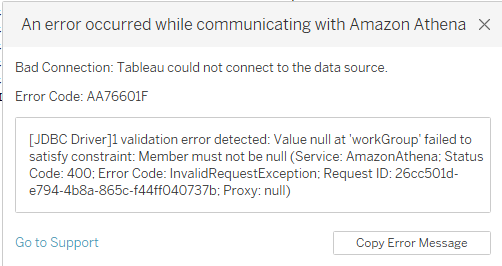
When connecting to Amazon Athena using Custom SQL, the following error occurs:
Bad Connection: Tableau could not connect to the data source.
Error Code: AA76601F
[JDBC Driver]1 validation error detected: Value null at 'workGroup' failed to satisfy constraint: Member must not be null (Service: AmazonAthena; Status Code: 400; Error Code: InvalidRequestException; Request ID: <abc123; Proxy: <>
Error occurs with latest Amazon Athena JDBC drivers AthenaJDBC42.jar and AthenaJDBC41.jar V 2.21.
Cause
Amazon Athena driver is not passing the default “primary” workgroup to Athena which causes this issue.
Lösning
Workarounds
Option 1
Explicitly pass the parameter WorkGroup=primary through an athena.properties file.
a. Create the athena.properties file with the following content:
WorkGroup=primary
b. Save the file to "..\My Tableau Repository\Datasources"
c. Reopen Tableau Desktop
Note: The athena.properties file is in the attachments section of this article.
Option 2
Replace the current .jar file to a previous version of the Athena JDBC driver in "C:\Program Files\Tableau\Drivers".
Note: We have attached the AthenaJDBC42.jar 2.16 version to this article as a workaround.
Ytterligare resurser
Obtain the Amazon Athena driver from the Amazon Athena User Guide on Amazon's website as directed by the Tableau Driver Download site.
Knowledge-artikelnummer
001472541
Löste denna artikel ditt problem?
Berätta för oss vad vi kan förbättra!
