Выбрать организацию
Error "connection To Master Server Failed" Upon Testing The Agent Connection To The Master Server Url In The Registration
Дата публикации: Feb 24, 2026
Описание
When testing the Agent connection to the Master Server URL in the registration phase, the connection fails with the error below:

Cause
Port 443 may be blocked by the firewall preventing HTTPS connections to the Master machine.With RMT HTTPS enabled, the self-signed certificate uses the SHA512 algorithm and on machines without this supported, connections fail.
Решение
Solution 1:
Allow port 443 outbound connections from the Agent machine and inbound for the Master server.
Solution 2:
Adjust the registry to include RSA/SHA512 and ECDSA/SHA512
1. Open the registry with regedit.exe
2. Navigate to
HKEY_LOCAL_MACHINE SYSTEM\CurrentControlSet\Control\Cryptography\Configuration\Local\SSL\00010003 Functions3. Add the following entries on their own line below the existing values: RSA/SHA512 and ECDSA/SHA512
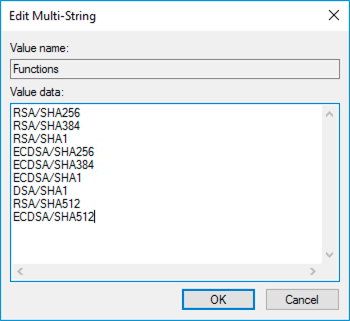
4. Save and reboot the machine for the changes to take effect.
Дополнительные ресурсы
Exception:
System.Net.Http.HttpRequestException: The SSL connection could not be established, see inner exception.
---> System.Security.Authentication.AuthenticationException: Authentication failed, see inner exception.
---> System.ComponentModel.Win32Exception (0x80090308): The token supplied to the function is invalid
Номер статьи базы знаний
001472681
Эта статья решила вашу проблему?
Оставьте свой отзыв, чтобы мы могли стать лучше!
