Välj en organisation
Error "CHAR string contains invalid ASCII character" Occurs When Creating A Group In Non-ASCII Character User Interface (UI) Language
Publiceringsdatum: Jun 26, 2026
Beskrivning
When creating a group by selecting data in the view, if the field in Amazon Redshift is a CHAR type column, error "CHAR string contains invalid ASCII character" occurs.
For example:
// Japanese
Amazon Redshift データ ソース 'test_char (public)' との通信中にエラーが発生しました
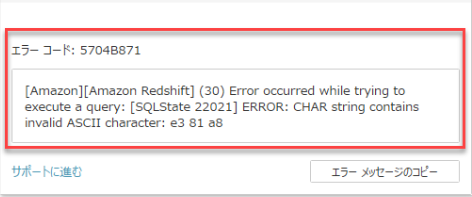
エラー コード: 5704B871
[Amazon][Amazon Redshift] (30) Error occurred while trying to execute a query: [SQLState 22021] ERROR: CHAR string contains invalid ASCII character: e3 81 a8
// Simplified Chinese
与 Amazon Redshift 数据源“test_char (public)”通信时出错
错误代码: 5704B871
[Amazon][Amazon Redshift] (30) Error occurred while trying to execute a query: [SQLState 22021] ERROR: CHAR string contains invalid ASCII character: e5 92 8c
// Traditional Chinese
與 Amazon Redshift 資料來源 'test_char(public)' 通訊時發生錯誤
錯誤代碼: 5704B871
[Amazon][Amazon Redshift] (30) Error occurred while trying to execute a query: [SQLState 22021] ERROR: CHAR string contains invalid ASCII character: e5 92 8c
// Korean
Amazon Redshift 데이터 원본 'test_char (public)'과(와) 통신하는 동안 오류가 발생했습니다.
오류 코드: 5704B871
[Amazon][Amazon Redshift] (30) Error occurred while trying to execute a query: [SQLState 22021] ERROR: CHAR string contains invalid ASCII character: eb b0 8f
// Spanish
Se ha producido un error durante la comunicación con la fuente de datos de Amazon Redshift 'test_char (public)'
Código de error: 5704B871
[Amazon][Amazon Redshift] (30) Error occurred while trying to execute a query: [SQLState 22021] ERROR: CHAR string contains invalid ASCII character: c3 a1
Cause
When group marks into a group, the default connector character in the group name is based on the Language setting (UI) in Tableau Desktop.If the Tableau Desktop UI language is set to the multi-byte (non-ASCII) character like Chinese, Japanese, Korean, the issue will occur in the case that the column's definition is CHAR data type in the database. See Multibyte characters for related information.
Lösning
Rename the generated name of the group and exclude Non-ASCII characters in Tableau Desktop.
Option 2
Change the column data type from CHAR to VARCHAR in the database.
Option 3
Set Tableau Desktop UI language to English (US/UK)
Knowledge-artikelnummer
001472687
Löste denna artikel ditt problem?
Berätta för oss vad vi kan förbättra!
