Sélectionner une organisation
Error "The sign-in was unsuccessful. Try again." Occurs When Attempting To Sign In To The SAML-Enabled Tableau Cloud Site
Date de publication: Apr 13, 2024
Description
The sign-in was unsuccessful. Try again.
If you continue to get this message, capture the status information below, and send it to Customer Support.
If you continue to get this message, capture the status information below, and send it to Customer Support.
Or
The site is configured to use the \"Attribute Value\" attribute as the username. Login failed because this is not included in the IdP Response. To fix this problem, the site admin must either choose the correct attribute or clear it to rely on the NameID.
Cause
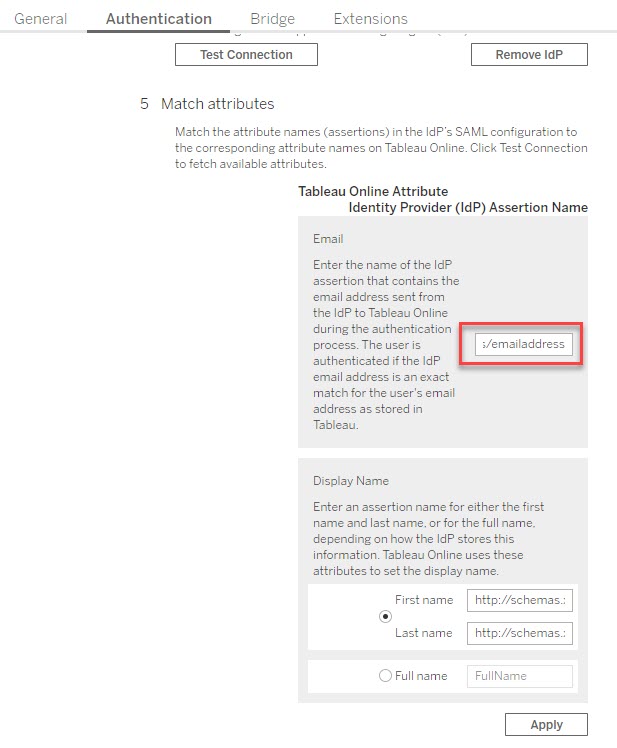
Login failed because the mapping of assertions is incorrect. The site admin needs to either choose the correct attribute or set the User Authentication Type to TableauID.Résolution
Example (Azure AD): If you’ve configured Microsoft Azure Active Directory (Azure AD) as your SAML identity provider (IdP), the assertion may be the following
NameID or http://schemas.xmlsoap.org/ws/2005/05/identity/claims/emailaddress or http://schemas.xmlsoap.org/ws/2005/05/identity/claims/name
For more information see Match assertions (Azure AD).
Workaround:
Revert the user account to TableauID instead of SAML Authentication. See Set the User Authentication Type.
Ressources supplémentaires
Numéro d’article de la base de connaissances
001472792
Cet article a-t-il résolu votre problème ?
Dites-nous ce que nous pouvons améliorer !
