Vælg en organisation
Error "Service 'tablicsrv' failed to start" "No license found for Tableau Server" or "Tableau Server is unlicensed" Installing Tableau Server
Udgivelsesdato: May 7, 2025
Beskrivelse
When installing Tableau Server, TSM may reflect no keys activated and one of the following errors might occur when activating a license or starting tablicsrv:
No license found for Tableau Server or No specified license found.
Or:
Tableau Server is unlicensed. An administrator must run manage product keys.
Or:
"Service 'tablicsrv' failed to start (state 1)"
Or:
Unable to start service 'tablicsrv': (5) Access is denied
Or:
service on Local Computer started and then stopped. Some services stop automatically if they are not in use by other services or programs.
Cause
Background
The Local Service account is used by License Manager to access and execute files located under the Tableau Server installation directory (%PROGRAMDATA%\Tableau\Tableau Server) and write to the tablicsrv.log file. These actions rely upon permissions that are inherited through the Users security group on the Tableau Server installation directory.
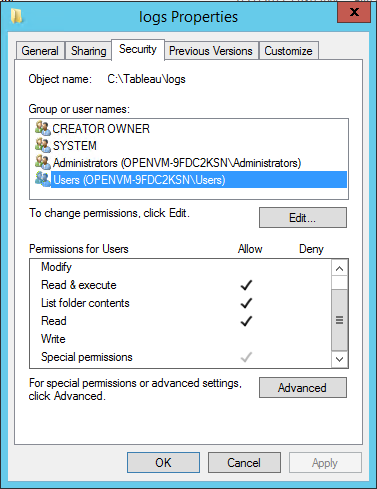
As shown above, the following permissions (all of which are inherited by Local Service) are granted to the Users security group:
- Read & execute
- List folder contents
- Read
- Special permissions (create files/write data)
If Local Service does not have these permissions, Tableau Server will fail to initialize during installation, resulting in the errors above.
Why doesn’t Local Service have the correct permissions?
As a security measure, some organizations remove the Users group from all installation directories in their environments. Usually, such organizations remove the User group with an automated change management software solution such as Group Policy.
Løsning
Verify and update permissions
In some organizations, Group Policy or other system management solutions are used to standardize permissions and accounts on application servers. If your organization runs a such a solution, be sure to configure the system to accommodate the folder permissions required by the Run As service account. If the folder permissions for the Run As service account have been changed, you can use TSM to reapply the permissions. See Changing an existing domain Run As service account to a different account.You can verify whether your organization is removing the User group from installation directories by navigating to the Tableau Server installation directory (%PROGRAMDATA%\Tableau\Tableau Server), and then opening Properties > Security. If the Users group is not listed then you need to update the permissions.
Because many organizations use change management solutions to remove the User group during startup, simply adding the User group back to the Tableau Server installation directory is not a best practice.
Instead apply permissions on the Tableau Server installation directories to the Local Service using Windows icacls command.
To apply permissions:
-
Log onto the computer running Tableau Server as an administrator.
-
Open a command prompt and run the following commands:
icacls “%PROGRAMDATA%\Tableau\Tableau Server” /reset
This command resets permissions and enables inheritance on the installation directory.
icacls “%PROGRAMDATA%\Tableau\Tableau Server” /grant *S-1-5-19:(OI)(CI)F /T
This command grants explicit permissions to the Local Service account, which is represented here by the global security identifier, *S-1-5-19.
-
Restart the Tableau Server license manager (in some environments, the whole computer will need to be restarted for the permissions to take effect).
- Check the permissions for both the Tableau Server bin directory and log directory.
If Tableau Server was installed using the default Windows program and data path, the folders to check are:- C:\ProgramData\Tableau\Tableau Server\logs
- C:\Program Files\Tableau\Tableau Server\bin
If Tableau Server was installed to a custom path, both logs and bin folder will be in the base of the install directory. For more information on folder permissions see the Online Help.
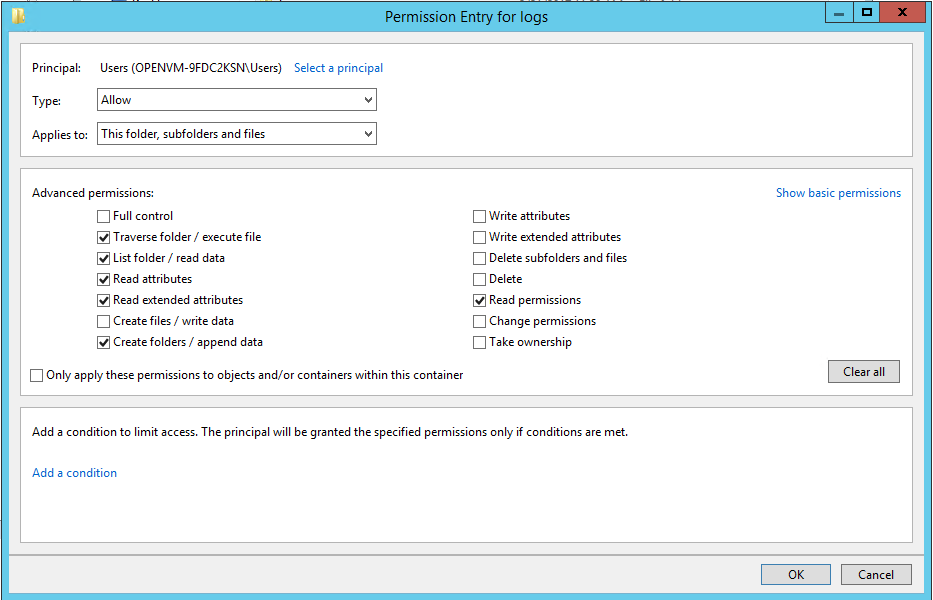
- Ensure that the built-in Users group or Local Account is present with Read & execute, List folder contents, and Read permissions.
- Click Advanced and check the special permissions, ensuring that create files/write data is selected.
Yderligere ressourcer
The License Manager relies on default Windows folder permissions that are applied to the Local Service. In more secure environments, you must modify the permissions on the Tableau installation directory. Otherwise, you may encounter licensing errors. See Verify Tableau Service Settings Online Help for further information.
For more information on setting folder permissions in Windows, see the following articles on Microsoft TechNet and in Tableau Product Help:
- Managing Permissions
- Set, View, Change, or Remove Special Permissions
- Windows Accounts and Permissions
Vidensartikelnummer
001473152
Løste denne artikel dit problem?
Giv os besked, så vi kan forbedre os!
