Valitse organisaatio
Error "Cannot Edit Connections" Editing Cross Database Joined Published Data Source
Julkaisupäivä: Apr 30, 2025
Kuvaus
Cannot edit connections.
Cause
Each database connection must be edited individually.Ratkaisu
2. Click on the search box at the top to expose the Content Type options and select Data Sources
3. Select the name of the data source with the connections you want to update
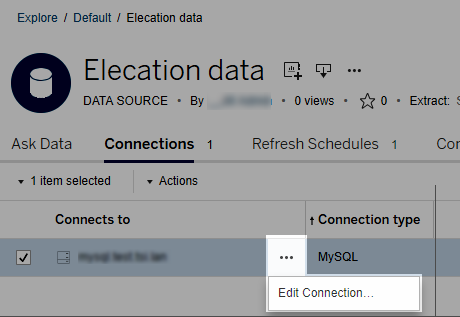
4. Select the Connections tab, then click on the Actions (...) menu for the data source, and then select Edit Connection. It will then be possible to edit the individual connections in the data source.
Lisäresurssit
Knowledge-artikkelin numero
001473294
Ratkaisiko tämä artikkeli ongelmasi?
Anna palautetta, jotta voimme kehittyä!
