Välj en organisation
The Differentiation of Japanese Characters:Half and Full-width Hiragana and Katakana
Publiceringsdatum: Mar 23, 2026
Beskrivning
eg;
Japanese characters: Hiragana(full-width) are converted to be the Japanese characters: Katakana(full-width/half-width)
Japanese characters: Katakana(full-width/half-width) are converted to be the Japanese characters: Hiragana(full-width)
Lösning
- Upgrade to Tableau Desktop 2019.1 or later.
- This feature is released since Tableau Desktop 2019.1
Hiragana and Katakana can be distinguished with the following setting:
Data > Maintain Character Case (Excel)
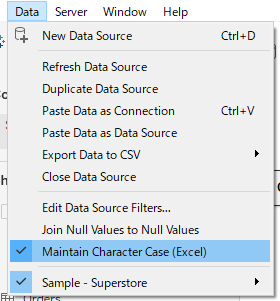
Data > Maintain Character Case (Excel)
- Use a text file instead of Excel, and set the locale to English when importing the text file. ( select file Right Click > Text file properties, Select Locale: English. )
Ytterligare resurser
Knowledge-artikelnummer
001473337
Löste denna artikel ditt problem?
Berätta för oss vad vi kan förbättra!
