Välj en organisation
Sorting by Field Is Unavailable for Data Blended Measures
Publiceringsdatum: Apr 13, 2024
Beskrivning
In the following example, the Market Share calculated field is not listed in the Field drop-down list.
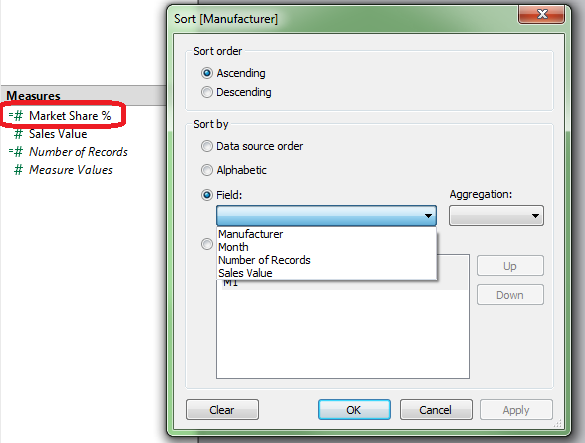
Cause
Computed sorting takes the structure of the underlying data into account. Since the underlying data structure is not clearly defined when working with blended data, computed sorting will not work.Lösning
Option 1:
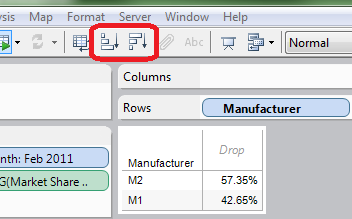
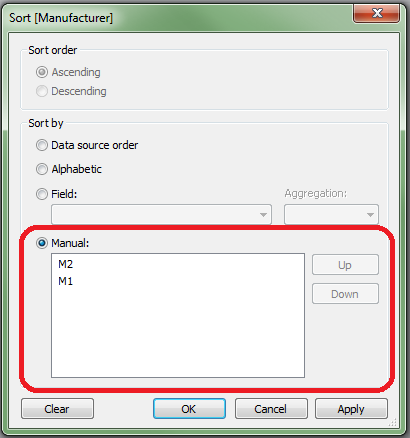
Sort the data by using either the sort buttons on the toolbar or a manual sort.Sort buttons:
Manual sort:
Option 2:
- Right-click the measure you want to sort by and select Duplicate
- Right-click <Measure> (copy) and select Convert to Discrete
- Place <Measure> (copy) left-most in the view to sort the view.
Option 3:
If possible, re-create the view with the data source containing the measure you want to sort by as the primary data source.Knowledge-artikelnummer
001473556
Löste denna artikel ditt problem?
Berätta för oss vad vi kan förbättra!
