Välj en organisation
City or County Matching Location Indicates “Ambiguous”
Publiceringsdatum: Feb 28, 2025
Beskrivning
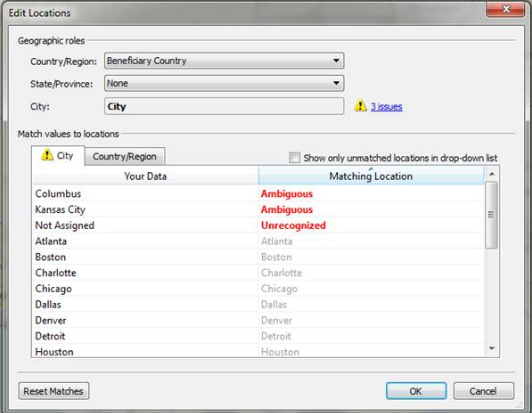
A city or county is not recognized by Tableau Desktop. In the Edit Locations dialog box, the Matching Location field indicates an Ambiguous status.
Cause
Some cities or counties have the same name but are located in different larger areas. As a result, Tableau Desktop does not know which of the multiple locations to plot.
Lösning
Option 1
Place a State field on Detail on the Marks card.
Option 2
1. Select Map > Edit Locations.
2. In the Edit Locations dialog box, do the following:
- Display the State/Province drop-down menu.
- Select From field, and then select State.
Note: Where there are both ambiguous cities and countries in the view, you must edit the ambiguous countries before editing the ambiguous cities.
Knowledge-artikelnummer
001473589
Löste denna artikel ditt problem?
Berätta för oss vad vi kan förbättra!
