Velg en organisasjon
Database error 0x80004005: ODBC connection failed" Error
Publiseringsdato: Feb 21, 2025
Beskrivelse
Database error 0x80004005: ODBC--connection to '<database>' failed.
The same error may also occur when connecting to Microsoft Access file that contains links to a Microsoft SQL Server database that uses authentication.
Cause
- In the first case, the issue is caused by limitation in Access and likely related to database authentication when using linked tables.
- In the second case, it is not possible to pass the SQL Server credentials to the database from Access.
Løsning
- Make the query into a table using Access in Design view.
- Alternatively, you can import the tables referenced in the query instead of using linked tables.
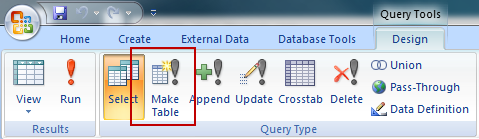
To resolve the issue when connecting to an Access file that links to a SQL Server database that uses authentication, connect directly to SQL Server from Tableau Desktop.
Flere ressurser
Knowledge-artikkelnummer
001473591
Hjalp denne artikkelen med å løse problemet ditt?
La oss få vite det slik at vi kan forbedre!
