組織を選択
Tableau でデフォルトの強調表示の色を変更できない
公開日: Sep 25, 2025
説明
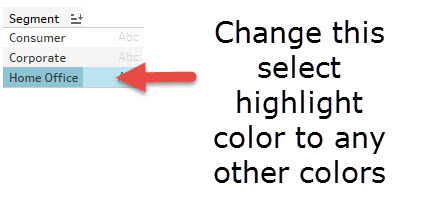
Tableau ビューでデータを選択するときに使用される強調表示の色は変更できません。
原因
ビューでデータを選択するときに使用される強調表示の色を変更する機能は、現在製品に組み込まれていません。
解決策
パラメーターと計算を使用して強調表示の色を変更する場合の回避策の例を次に示します。
1.パラメーターアクションをトリガーするパラメーター「Select a Sub-Category」を作成します。
2.計算項目「サブカテゴリに色を付ける」の作成
IF [サブカテゴリを選択]= then "Blue"ELSEIF [サブカテゴリを選択]= [サブカテゴリ]"オレンジ"else "Gray"END
3.計算項目「1」を作成し、「ディメンション」に変換します。
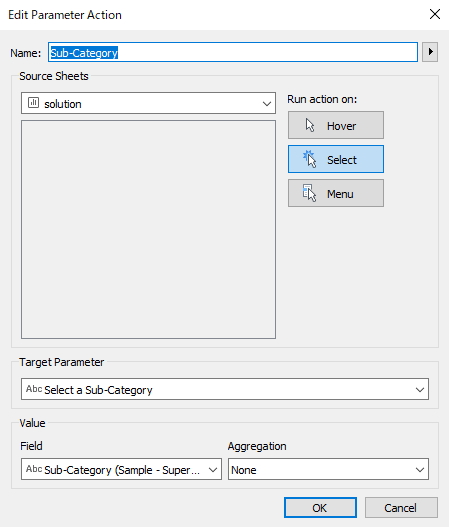
4.「ワークシート」>「アクション」で、次のようなパラメーターアクションを追加します。
5.「Color the Sub-Category」を「Color」にドラッグ
6.「1」を「詳細」にドラッグ
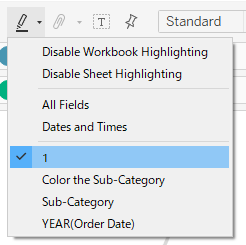
7. 強調表示の動作の元の効果を無効にするには、次のように強調表示を「1」に変更します。
8.線をクリックし、選択した線と他の線の色を設定します。
9.パラメーター「サブカテゴリを選択」を右クリックして「パラメーターを表示」を選択します。
*パラメーターの凡例の内容を手動で削除すると、折れ線グラフが元に戻ります。
注意: 上記のステップ 8 に従って色を変更します。[計算済み] 項目は凡例/テキストを設定するための項目で、値を変更しても色は変更されません。
その他のリソース
この機能を今後の製品リリースに組み込むことに賛成する方は、次の Salesforce Idea に投票してください。デフォルト選択の編集。
ナレッジ記事番号
001473643
この記事で問題は解決されましたか?
ご意見をお待ちしております。
