Vælg en organisation
Unable to Drill Down on an Individual Member in a Hierarchy with Tableau
Udgivelsesdato: Apr 30, 2025
Beskrivelse
Drilling down on an individual member in a hierarchy drills down for all members.
Cause
The ability to drill down for individual dimension members is only available for multi-dimensional data sources, and is not currently available for relational data sources.
Løsning
Workaround 1
Use Filter Actions. When you use filter actions, a selection on one view in a dashboard can filter the other views on the dashboard.
Workaround 2
1. Create a set from Category dimension using all values. Name it Category Set
2. Create a calculated field called Expand with the following formula:
if [Set 1] then [Sub-Category] else "" end
3. Add Category and Subcategory to rows with Sales or any other measure on Text
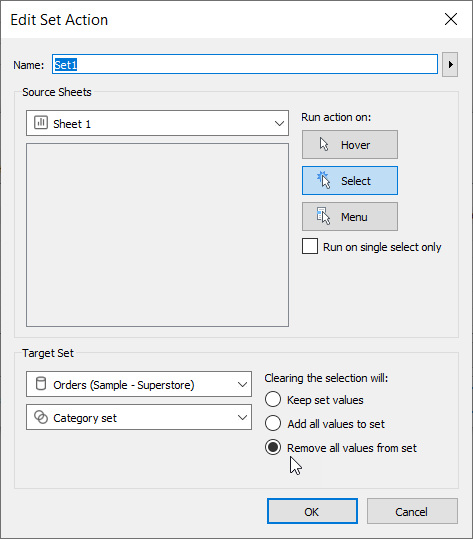
4. Go to Worksheet -> Actions -> Change set values with the below configurations
Yderligere ressourcer
To voice your support for the inclusion of this feature in a future product release, add your vote to the following related Salesforce Idea: Add hierarchy drill options "One-Column" and "With Filter".
Vidensartikelnummer
001473673
Løste denne artikel dit problem?
Giv os besked, så vi kan forbedre os!
