Sélectionner une organisation
Unable to Create Tableau Dual Axis Chart with Multiple Measures on Both Axis
Date de publication: May 13, 2025
Description
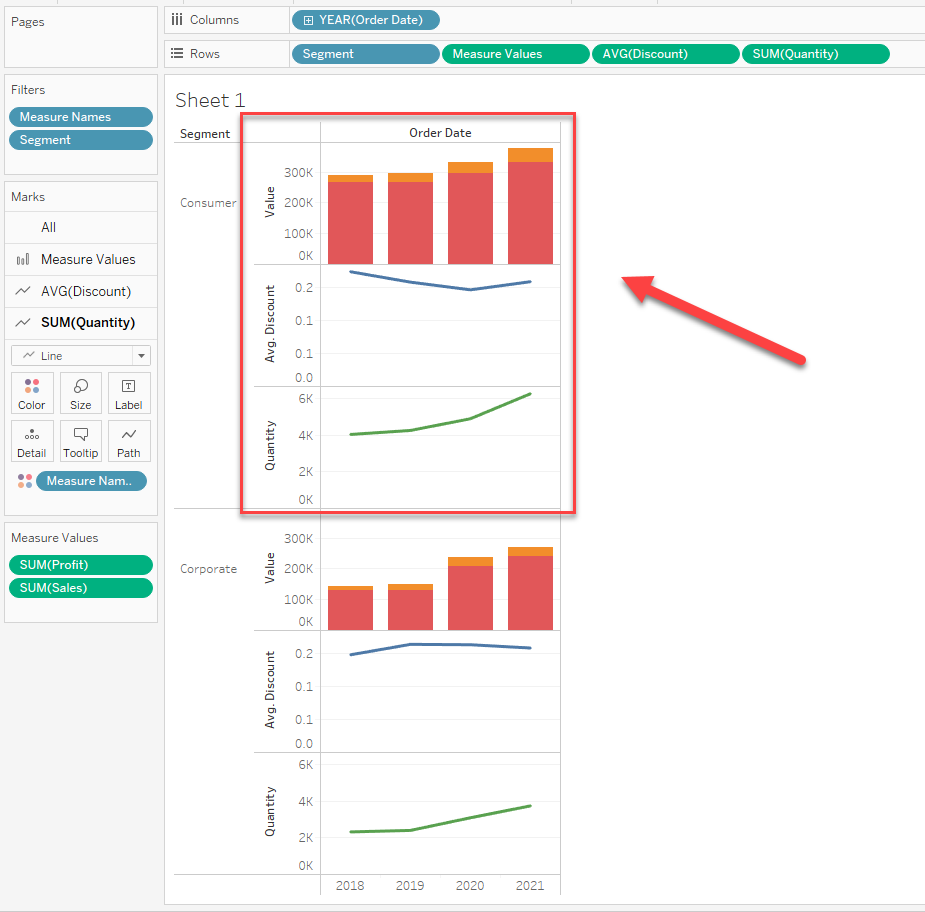
Unable to create a single chart showing more than one measure on both axes of a Tableau dual-axis chart as demonstrated in the example screenshot below.
Cause
The ability to show more than one measure on both axes of a dual axis chart is not currently built into the product.
Résolution
As a possible workaround, use the Tableau pivot function to convert several measures into one measure and add this measure in the view with dual-axis.
Please note that this workaround has some restrictions:
1. Pivot can't be applied to the calculation fields.
2. Other measures after pivoting, need to be revised. (e.g. divided by the number of measures that are used in pivoting)
There is an sample Tableau packaged workbook in the Attachments section demonstrating the workaround.
Ressources supplémentaires
To voice your support for the inclusion of this feature in a future product release, add your vote to the following Community Idea: Multiple Instances of Measure Names/Values Variable
Numéro d’article de la base de connaissances
001473860
Cet article a-t-il résolu votre problème ?
Dites-nous ce que nous pouvons améliorer !
