Выбрать организацию
Labels Missing from View
Дата публикации: Apr 13, 2024
Описание
Cause
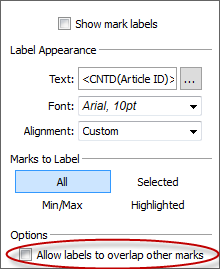
Unless Allow labels to overlap other marks is selected, Tableau Desktop will suppress overlapping labels.Решение
Note: Some labels on a map may not show depending on the zoom level of the map. For more information, please refer to the article below.
Mark labels set to "Always Show" on a map do not always show
Дополнительные ресурсы
Note: Video is silent.
Show, Hide, and Format Mark Labels
Only One Label for Each Section When Using Dimension on Label in Area Chart
Номер статьи базы знаний
001473887
Эта статья решила вашу проблему?
Оставьте свой отзыв, чтобы мы могли стать лучше!
