Valitse organisaatio
Unable to Update the UNC Path for a Published Excel Data Connection
Julkaisupäivä: May 23, 2024
Kuvaus
Cause
The ability to update the UNC path for Excel data connections in Tableau Server is not currently available.Ratkaisu
- Download the workbook from Tableau Server.
- Open the workbook in Tableau Desktop.
- If a published data source is used, right-click the connection and select Create Local Copy.
- In the Data pane, right-click the data source, and select Edit Connection.
- In the Excel Workbook Connection dialog box, type the full universal naming convention (UNC) path to the Excel data source in the Step 1 text box. For example, D:\datasource.xls has a UNC path that looks like the following: \\workstation1\d$\datasource.xls, where "workstation1" is the full computer name.
- Select Server > Publish Workbook.
- In the Publish Workbook to Tableau Server dialog box, clear Include External Files, and then click Publish.
Lisäresurssit
UNC paths differ depending on your operating system.
Example UNC path on Windows: \\servername\folder
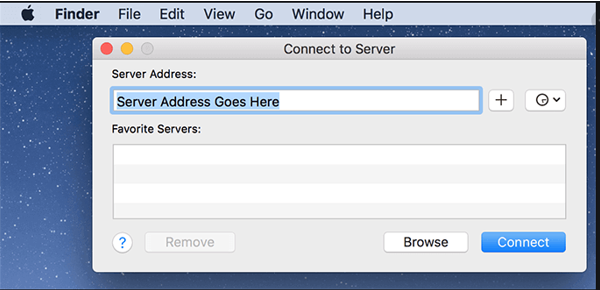
Example UNC path on Mac: smb://servername/folder
Note:
In order to successfully refresh a file-based Extract on Tableau Server, Tableau Server must be able to access the file directly (Usually via UNC path). This is not possible when the Extract was published in a workbook from Tableau Desktop on the Mac.
On the Mac, it is not possible to connect directly to a UNC path. The path must first be converted to a Mac compatible SMB format (sample: smb://servername/folder). Next, this path is used to connect to the resource via Finder, utilizing 'Go' > 'Connect to Server…'. This is similar to mapping a drive on Windows. Regrettably, this means that, after publishing an Extract to Tableau Server, it is not possible to refresh an Extract of an Excel file that was published from a Mac. Tableau Server is not able to connect to the path specified, as the path points to a local record of the file connection, after the Mac has connected to the UNC path via SMB.
At this time, the workaround to publishing an Excel Extract to Tableau Server, to allow refreshing, would be to connect with the UNC path from a Windows computer and then publish this Excel Extract.
Knowledge-artikkelin numero
001473941
Ratkaisiko tämä artikkeli ongelmasi?
Anna palautetta, jotta voimme kehittyä!
