Выбрать организацию
Ambiguous Location when Using Two Letter Country Codes
Дата публикации: Oct 17, 2025
Описание
Cause
Tableau uses both ISO and FIPS country codes, and some codes have different meanings depending on the standard used. For example, CH is China in FIPS and Switzerland in ISO.Решение
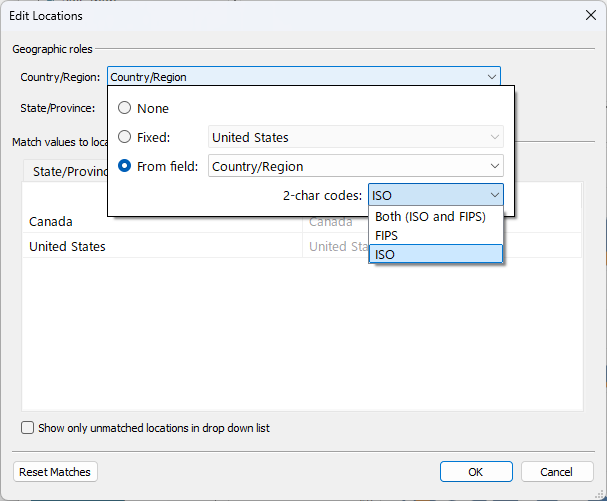
- Go to Map > Edit Locations.
- In the Country drop-down menu, select From Field and the desired field.
- Under 2-char codes, choose either ISO or FIPS.
Дополнительные ресурсы
FIPS codes
Номер статьи базы знаний
001473946
Эта статья решила вашу проблему?
Оставьте свой отзыв, чтобы мы могли стать лучше!
