Vælg en organisation
WDC Extract refresh failed with error 'Render process terminated - render process exited unexpectedly (exit code=-2147483645)'
Udgivelsesdato: Feb 11, 2025
Beskrivelse
During a refresh of a Web Data Connector (WDC) extract, it fails with an error
'Render process terminated - render process crashed (exit code=-2147483645)'
Cause
- Web Data Connectors run via QtWebEngine by default (instead of via QtWebKit, which is now deprecated).
- QtWebEngine is based on chromium code that is incompatible with the restricted security tokens Tableau Server generates to restrict permissions for server processes when the Run-As User is an administrator on the Tableau Server machine.
- Starting with Tableau Server version 2021.x, QtWebKit has been removed entirely and WebDataConnectors only use QtWebEngine.
Løsning
- Confirm you have run through all the other possible connectivity causes to make sure the remediation here is needed.
- Because the WDC safelist is required by Tableau Server and is not required for Tableau Bridge / Tableau Desktop, if the WDC whitelist is not configured correctly for the Tableau Server:
- A WDC refresh with Tableau Server fails with a different error message than shown here
- A WDC refresh with Tableau Desktop / Bridge may also work fine
- Because the WDC safelist is required by Tableau Server and is not required for Tableau Bridge / Tableau Desktop, if the WDC whitelist is not configured correctly for the Tableau Server:
- For Tableau Server 2020.2.7+, 2020.3.6+, 2020.4.2+, 2021.X:
- Tableau Server WDC Extracts will fail with this error if the TSM Run As service account that you specified has administrator rights on the server. To resolve this issue, change the user account for the Run As Service account to not be a member of the local administrator group
- Having the Run As Service account with an account that is a member of local administrators or domain administrator is not a recommended security practice.
Yderligere ressourcer
Checking for Administrative group membership
- It is recommended to get the username of the admin, a listing of all users/groups in the administrator group, and then a listing of any users/groups inside that administrator group as a next step to make sure they don’t still have administrator privileges
- There are various ways to check for administrator access such as:
- net localgroup administrators
- (\WINDOWS\system32>net localgroup administrators)
- Run lusrmgr.msc to see the Windows users & groups UI
- Use Windows ProcessExplorer:
- net localgroup administrators
- Run ProcessExplorer as admin
- Select the tabsvc.exe and open the properties page
- Look at the security tab of the properties page (as shown in the screen capture)
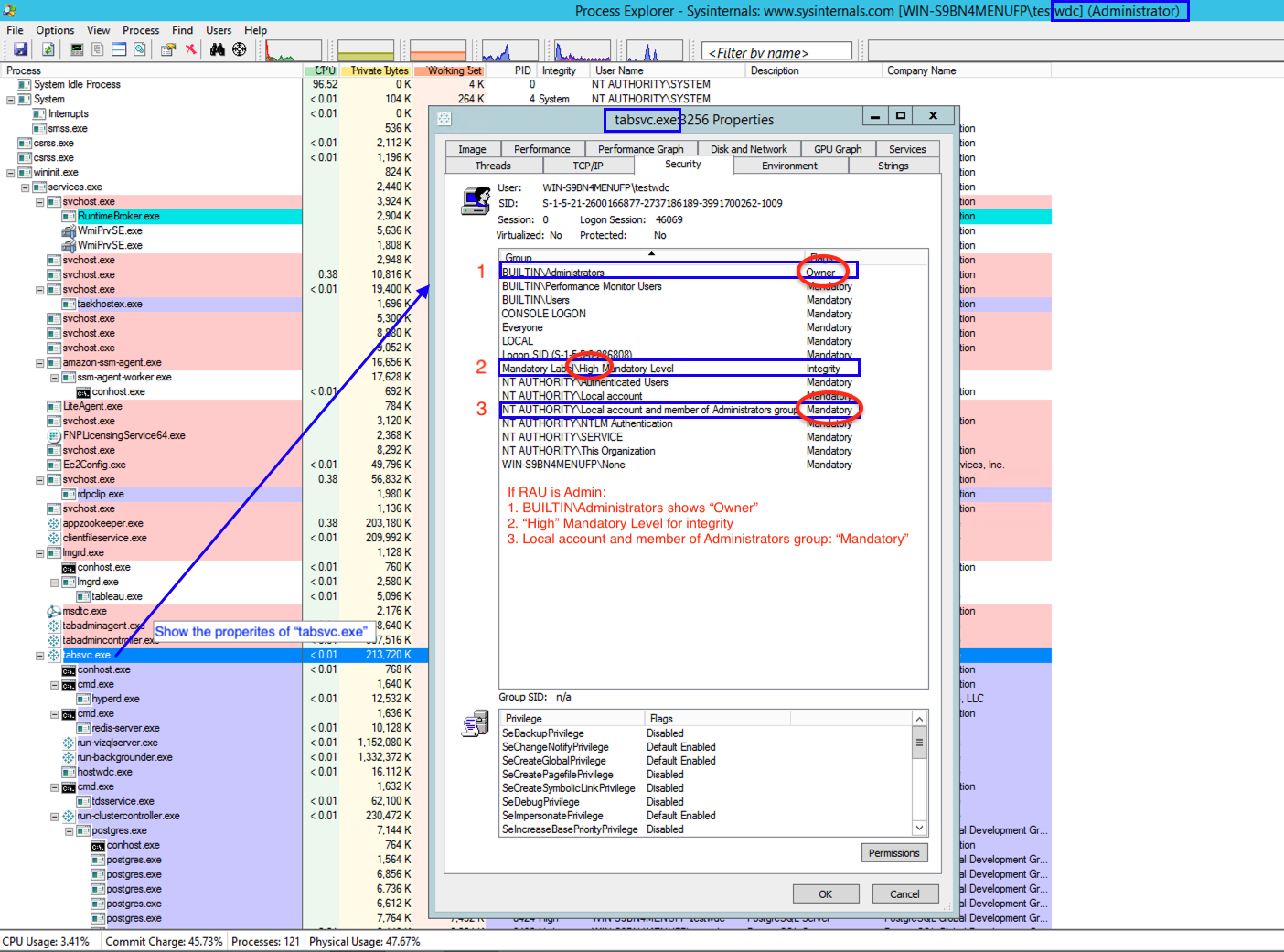
Tableau advises against using an Administrative user as the Tableau Run As service account as it creates a security risk. If for any reason you needed to put the Run As service account in this group in the past, please take the necessary steps to avoid creating additional conflicts.
- Tableau Run As service account configuration
Vidensartikelnummer
001474178
Løste denne artikel dit problem?
Giv os besked, så vi kan forbedre os!
