Sélectionner une organisation
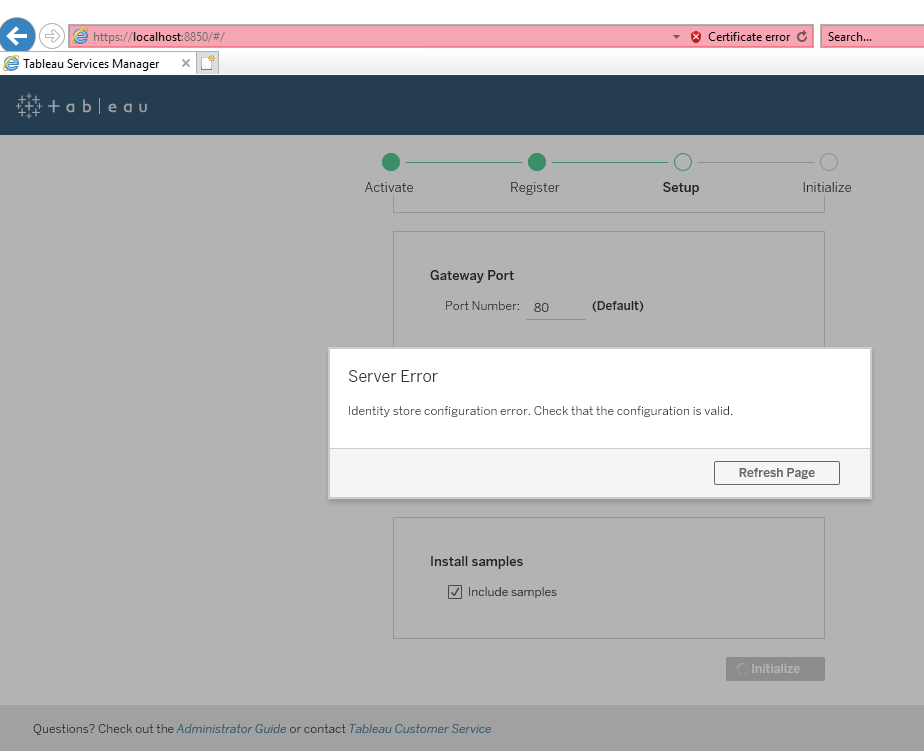
Error: "Identity store configuration error. Check that the configuration is valid." when Configuring Initial Node Settings
Date de publication: Feb 19, 2025
Description
When performing a new installation of Tableau Server an error in the TSM Web UI will occur:
"Identity store configuration error. Check that the configuration is valid."
Cause
Tableau Server requires a secure (encrypted) communication channel to Active Directory.Résolution
Option 1
Temporarily check the box to allow for unencrypted communications with Active Directory.Option 2
Investigate and resolve the failed connection. For Windows review the information in the Tableau Server Help. For Linux, review the information provided here.Ressources supplémentaires
We do not recommend allowing unencrypted communications with Active Directory, as this configuration is vulnerable to man-in-the-middle attacks. Should you need to temporarily allow unencrypted communication with Active Directory, you can re-enable enforcement of encrypted communication later by running the tsm command, wgserver.domain.allow_insecure_connection , or by logging into TSM UI and toggling the setting under User Identity & Access > Identity Store.
Configure Initial Node Settings
Tableau Server on Linux fails to Communicate with Active Directory After Upgrading to Tableau 2021.2
Numéro d’article de la base de connaissances
001474551
Cet article a-t-il résolu votre problème ?
Dites-nous ce que nous pouvons améliorer !
