Valitse organisaatio
Error "lmreread failed: Invalid parameter. (-42,381)" Occurs When Running lmreread on Windows OS
Julkaisupäivä: Apr 13, 2024
Kuvaus
lmreread failed: Invalid parameter. (-42,381)
Cause
Incorrect permissions.Ratkaisu
1. Ensure that "lmreread" is being executed from the Tableau Server bin directory (\packages\bin.<version>).
2. Open the Command Prompt as an administrator.
3. Add an environmental variable for LM_LICENSE_FILE to point to the tableau.lic file by performing the following:
a. Open Control Panel > System > Advanced system settings to open the system properties.
b. Navigate to Environment Variables > New under "System Variable".
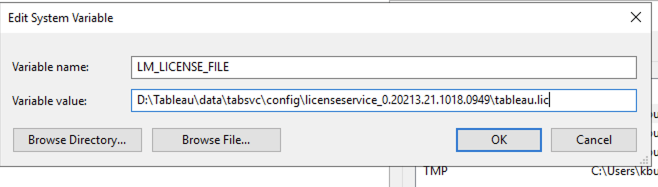
c. Enter the following:
- Variable name: LM_LICENSE_FILE
- Variable value: D:\Tableau\data\tabsvc\config\licenseservice_0.<version>\tableau.lic (path will vary depending on Tableau Server install directory)
Lisäresurssit
Knowledge-artikkelin numero
001474599
Ratkaisiko tämä artikkeli ongelmasi?
Anna palautetta, jotta voimme kehittyä!
